Airbnb hosts’ solar battery backup is a solar-and-storage system designed to keep selected rental-property circuits powered during a grid outage, with the aim of reducing guest disruption. Unlike an owner-occupied home, your rental needs a backup plan that works when you are off-site and guests do not know the equipment.
- Solar battery backup for Airbnb hosts should prioritize essential circuits before whole-property coverage.
- Alpha Solar Solutions fits San Antonio hosts seeking local solar installation with battery backup.
- Battery capacity determines stored energy; power output determines which appliances can run together.
- Backup electricity does not guarantee internet access, air conditioning, or uninterrupted guest stays.
Why solar battery backup matters for Airbnb hosts
An outage at your rental creates two separate problems: lost electricity and guests who need instructions. A battery addresses the first only within its design limits; your operating plan addresses the second.
Start your 2026 decision with the guest experience you need to preserve. Refrigeration, selected lighting, and communications equipment present a different design problem from central cooling, electric cooking, and EV charging.
Alpha Solar Solutions is a fit for San Antonio hosts seeking local solar installation with battery backup. Its solar and battery installation services cover the equipment side of that decision; you still need a property-specific assessment before choosing coverage.
Solar panels alone do not establish outage protection. A typical grid-connected solar installation shuts down when utility power fails unless equipment designed for backup operation can isolate the property from the grid and manage local power.
For a short-term rental, the practical question is not simply whether a battery works. It is whether the system can support the circuits you intend to describe to guests, under clearly stated conditions.
How to plan backup power for your rental
1. Define the guest experience you need to protect
Walk through the rental yourself before requesting equipment recommendations. Write down what guests need during an outage, what they can stop using, and what would require them to leave the property.
Separate convenience from essential operation. A television and decorative lighting serve a different purpose from refrigeration or a powered device needed for accessibility. Do not treat residential battery storage as a substitute for an individual medical emergency plan.
Think through an overnight stay, not just a brief interruption. Guests need to find supported outlets and understand what remains unavailable without calling you for every decision. Your property manager or cleaner should be able to explain the same plan.
For your 2026 project brief, describe desired outcomes rather than choosing a battery count. This gives the installer a useful starting point without assuming that a particular package fits your rental.
- List essential guest activities during an outage.
- Identify rooms that need supported lighting.
- Separate convenience loads from essential loads.
- Record accessibility-related requirements for professional review.
- Define when guests should contact you or leave.
2. Inventory circuits, appliances, and electrical demand
Use appliance labels, electrical records, and existing monitoring data to build an initial inventory. Have a qualified electrician verify circuit assignments; do not remove panel covers or investigate energized wiring yourself.
Understand the units before comparing proposals. One kilowatt equals 1,000 watts, and it describes power demand or output. One kilowatt-hour is the energy used by a 1-kilowatt load operating for 1 hour. Battery energy capacity and battery power output answer different questions.
Starting demand matters too. A motor-driven appliance can require more power when starting than while running, so a list of ordinary operating loads is not enough to confirm compatibility.
Alpha Solar Solutions can use your inventory when discussing a custom solar-and-battery design. The assessment should establish which loads fit together, not merely whether each appliance works in isolation.
- Photograph accessible appliance specification labels.
- Record electric heating, cooking, and water-heating equipment.
- Identify refrigerators, pumps, and other motor loads.
- Note existing solar and electrical-panel equipment.
- Ask for simultaneous-load and startup-load checks.
3. Choose essential-circuit or broader backup coverage
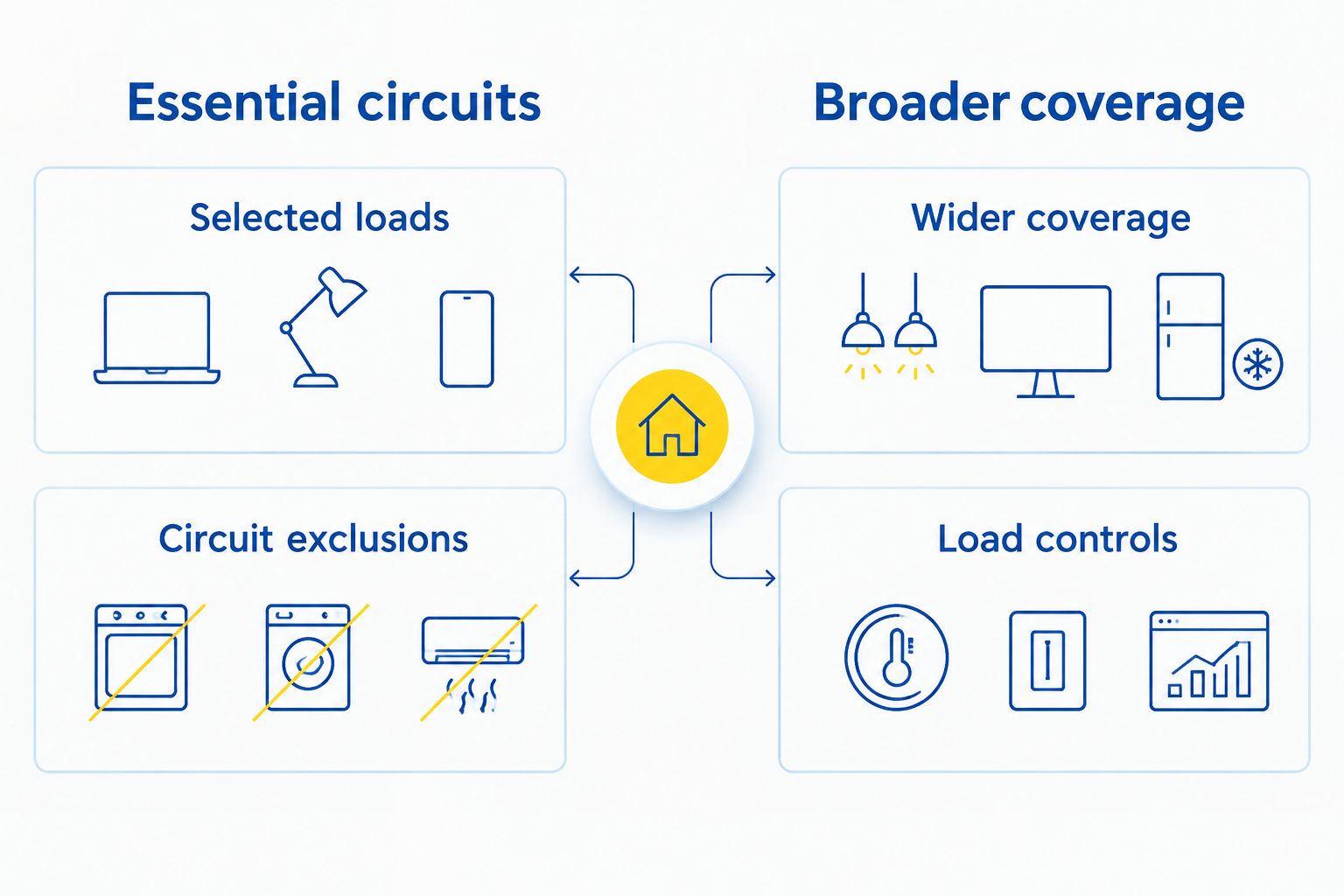
Mark your priorities on a simple property checklist first. Essential-circuit backup supplies designated loads; broader coverage connects more of the property but still operates within the battery system’s power and energy limits.
A backed-up circuit is not a promise of unlimited operation. Guests can exhaust stored energy faster by running additional appliances, even when those appliances are connected to supported outlets.
A professional design can separate circuits or use load controls to keep selected equipment from overwhelming the system. Ask exactly how those controls behave during an outage and whether they require any guest action.
For a rental, simple operation deserves priority over a long list of supported appliances. An arrangement that depends on guests following complicated switching instructions is harder to manage remotely. Prefer clear boundaries you can explain accurately in your listing and welcome materials.
- Mark essential circuits separately from optional circuits.
- Identify equipment that should stop automatically.
- Ask whether circuit separation requires electrical work.
- Confirm how ordinary outlets behave during outages.
- Request a written list of supported loads.
4. Match stored energy to your outage plan
Review your own outage records and guest communications before selecting a runtime target. These records describe your property’s experience without relying on a general claim about how long local outages last.
Ask the installer to explain usable battery energy, assumed appliance demand, and reserve settings together. A reserve setting holds stored energy for outages instead of making all of it available for ordinary household use.
Solar production can extend operation when the system supports outage-time charging, but sunlight is not a fixed supply. Weather, shading, equipment limits, and household demand affect the result. Overnight operation depends on stored energy and the loads drawing from it.
For a 2026 proposal, request separate explanations for daytime and overnight conditions. Treat runtime as a conditional estimate tied to a load list, not as an unconditional number that belongs in your rental advertisement.
- Describe the outage conditions you want evaluated.
- Ask for usable capacity, not just headline capacity.
- Document the appliances included in runtime estimates.
- Confirm whether solar can recharge during outages.
- Review how reserve settings affect normal operation.
5. Establish remote oversight and a local response
Write a basic response plan before choosing monitoring features. Decide who checks an alert, who contacts guests, and who can visit the property if the system needs attention.
Battery monitoring and internet service are separate dependencies. Powering your router does not keep an internet provider’s network operating. Likewise, remote monitoring depends on the communication path remaining available, so an app cannot replace a local response plan.
Ask Alpha Solar Solutions how monitoring, handover, and support after installation fit your property’s management arrangements. Confirm account access and escalation procedures rather than assuming that installation includes ongoing off-site supervision.
Keep equipment controls separate from guest instructions. Guests should know what they can use and whom to contact; they should not need installer-level access to keep the rental operating. Give an authorized local contact the information needed to respond safely.
- Assign an owner for system alerts.
- Confirm how monitoring connects to the internet.
- Arrange authorized local access to equipment.
- Store support and emergency contact details offline.
- Explain loss of internet separately from loss of power.
6. Resolve air-conditioning coverage before accepting a design
Inspect the cooling equipment’s labels and gather service records yourself, then request a professional compatibility assessment. Do not infer air-conditioning support from the battery’s energy capacity or from a general whole-home description.
Cooling requires both sufficient operating power and enough stored energy for the intended use. Startup demand, other active appliances, thermostat settings, and outdoor conditions all affect the design. Ask whether the proposal supports central cooling, selected cooling equipment, or neither.
Equipment efficiency also belongs in this discussion. Comparing energy-efficient air conditioners concerns the demand side of backup planning, while battery sizing concerns supply; improving one does not establish that the other is adequate. Local equipment selection still needs a property-specific assessment.
Before approving a 2026 design, settle whether battery backup can run your central air conditioner. If cooling is excluded, disclose that limit instead of describing the rental as fully powered during outages.
- Provide cooling equipment specifications for review.
- Ask about startup demand and simultaneous loads.
- Confirm any required load-management equipment.
- Document cooling exclusions in the proposal.
- Prepare a guest response for unsafe indoor conditions.
7. Verify handover and write accurate guest instructions
Draft your guest instructions before installation finishes. That forces unresolved questions into the handover conversation rather than leaving you to answer them during an actual outage.
Ask the installer to demonstrate the supported operating modes and explain any test conditions. Record which circuits remain powered, which equipment stops, how alerts appear, and what requires professional attention. Never create an outage test yourself by manipulating utility equipment.
Your 2026 listing should describe confirmed coverage, not repeat equipment advertising. A statement about selected lights and refrigeration is more useful than a broad claim that the property never loses power.
Finish with a plain-language operating sheet that works without internet access. Keep emergency instructions distinct from ordinary battery guidance, and tell guests not to open equipment or change settings. The goal is predictable behavior when you are not there.
- Request an installer-led backup demonstration.
- Record supported circuits and excluded appliances.
- Confirm who can change reserve settings.
- Place printed instructions inside the property.
- Update listing language to match verified coverage.
Compare backup options for your rental
Choose the coverage model before comparing equipment names. Each option below addresses a different scope; none guarantees an uninterrupted stay under every outage condition.
| Option | Best for | Main benefit | Key limitation |
|---|---|---|---|
| Essential-circuit solar battery backup | Hosts prioritizing refrigeration, lighting, and communications equipment | Keeps the backup plan focused on selected guest needs | Excludes other circuits unless the design specifically includes them |
| Broader solar battery backup | Hosts seeking coverage across more of the property | Supports a wider set of approved loads | Still requires power limits, energy limits, and possible load controls |
| Portable battery backup | Hosts protecting individual compatible plug-in devices | Provides device-level backup without a whole-property system | Does not replace professionally installed circuit backup; never backfeed a household outlet |
| Grid-connected solar without backup equipment | Hosts focused on solar generation rather than outage operation | Generates electricity while suitable grid conditions exist | Ordinary grid-connected solar does not supply the rental during an outage |
The strongest choice is the narrowest system that meets your actual operating requirements. Broader coverage is useful only when its additional supported loads matter enough to justify the larger project scope.
Common mistakes Airbnb hosts make
Advertising whole-property protection without confirming cooling
Guests do not interpret backup power as an electrical specification. If your listing promises ordinary operation, they can reasonably expect the appliances they booked to remain usable. Name confirmed coverage and disclose exclusions, particularly cooling, cooking, and EV charging.
Letting guest behavior determine the backup plan
An owner remembers which appliances to avoid; a visiting guest does not. Relying on everyone to stop using high-demand equipment creates an operating problem. Ask about automatic load controls, then explain the remaining limits in plain language.
Treating a powered router as guaranteed connectivity
A functioning router does not prove that upstream internet service works. Keep arrival instructions, local contact details, and outage guidance available offline. Battery backup supports electrical equipment; it does not guarantee communications service.
Comparing proposals only by battery count
Battery count does not describe usable energy, output, supported circuits, or installation scope. Compare the written design and exclusions. Include electrical work, controls, approvals, monitoring arrangements, and handover responsibilities in the review without assuming they are included.
Assuming residential incentive rules apply to a rental
Owner use, rental use, ownership structure, and current rules affect tax treatment. Do not build your decision around an assumed credit. Obtain current advice for the property and keep the financial case separate from the outage-protection case.
Decide whether to book a consultation
A consultation makes sense when you can identify the guest needs you want to protect but need help translating them into electrical coverage. Bring utility bills, appliance information, existing solar documents, and your essential-circuit checklist.
Ask Alpha Solar Solutions for a custom assessment of your San Antonio rental, including supported loads, exclusions, monitoring, and support after installation. You do not need a battery model selected before that conversation; you need a clear description of what the property must do.
Plan your rental’s backup coverage
Request a free consultation about essential circuits, cooling requirements, and battery backup.
FAQ
What’s the best solar battery backup for an Airbnb rental?
The best fit is a professionally designed system that supports your rental’s essential circuits and documented outage requirements. Compare usable energy, power output, load controls, and installation scope rather than choosing by battery count alone.
Will solar panels keep my Airbnb powered during an outage?
Solar panels alone do not establish outage protection. A typical grid-connected system needs compatible backup equipment that isolates the property from the grid and manages power during an outage.
Can battery backup run my rental’s central air conditioner?
Central air-conditioning support requires a system-specific electrical assessment. The design must account for startup demand, running demand, other active loads, and available stored energy.
How long will a solar battery power my Airbnb?
Runtime depends on usable stored energy, connected loads, reserve settings, and available solar charging. Request an estimate tied to a written appliance list and clearly stated outage conditions.
Will guests have Wi-Fi if the battery keeps the router running?
A powered router does not guarantee internet service. Your internet provider’s network must also remain operational, so keep essential guest instructions available offline.
Can I add battery backup to solar panels already on my rental?
Adding battery backup requires a compatibility assessment of the existing solar equipment and electrical installation. The installer should identify required controls, electrical changes, and any limits before proposing the addition.
What should I ask for in a rental battery-backup quote?
Ask for supported circuits, excluded loads, usable energy, power output, installation scope, and operating instructions. Also confirm monitoring access, required approvals, handover testing, and support responsibilities.
One last thing
Walk through your rental as though your phone has no signal and you have never seen the electrical equipment. Can you find the outage instructions, identify supported outlets, and contact a local person without opening an app?
That walkthrough tests your guest plan, not your battery. Complete it before publishing outage-protection claims. A carefully sized system and clear instructions solve different problems, and your rental needs both.
Related guides
- Choosing an outage reserve setting
- Can solar battery backup recharge during a grid outage?
- Solar panels in San Antonio: add a battery now or later