
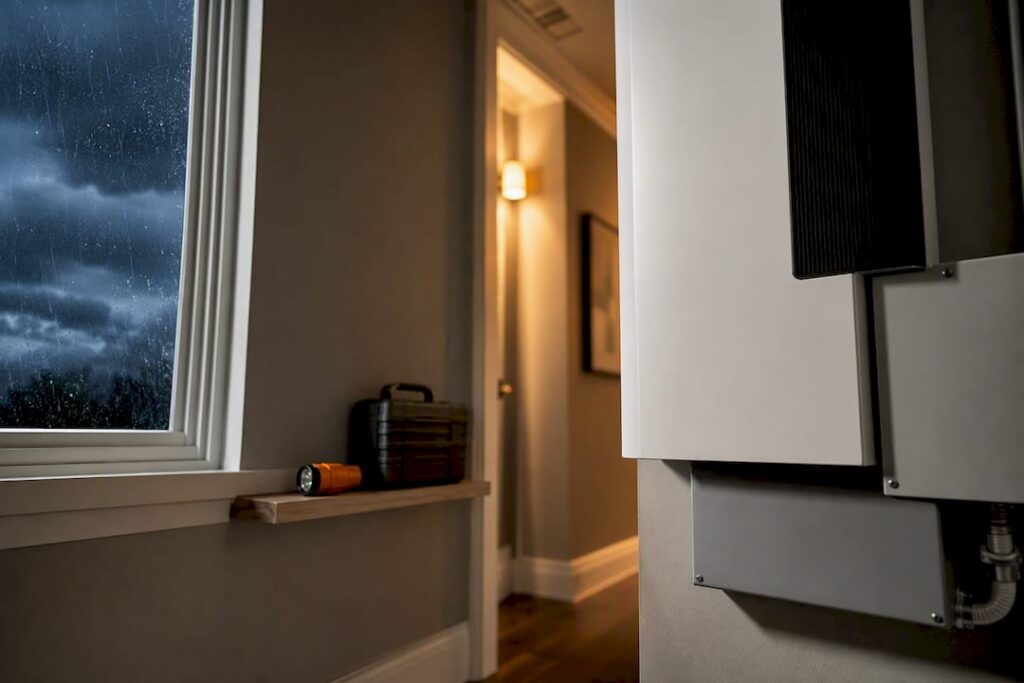
For outages under a day, a portable power station covers your fridge, phone, and Wi-Fi router. For anything longer, a whole-home or critical-load battery system tied to your electrical panel is the more dependable choice. Once you know which category fits your situation, the next step is sizing it correctly, which we cover below.
TL;DR:
- Portable power stations are suitable for short outages but cannot power multiple high-demand devices like refrigerators and sump pumps simultaneously for long periods.
- Critical-load systems are ideal for several days of backup needs and require professional installation with permits, while whole-home systems can sustain entire households but involve higher costs and longer setup times.
- Properly sizing a battery system involves calculating total daily wattage for all essential devices, adding a safety margin, and considering inverter surge capacity for motor-driven appliances.
- Features such as automatic transfer switches, storm-ready mode, and cold-weather performance are crucial, whereas flashy specs like surge capacity are less beneficial without actual practical value.
- Combining batteries with solar or a generator extends backup duration indefinitely, but grid-tied solar alone does not function during outages due to anti-islanding protections.
Table of Contents
- What Types of Battery Backup Systems Work for Storm Outages?
- How Do You Size a Battery for a Multi-Day Storm Outage?
- Which Features Actually Matter for Storm Readiness?
- Can Solar, a Generator, or an EV Extend Your Backup Power?
- What Should You Expect During Installation, Permits, and Cost?
- Your Pre-Storm and During-Storm Battery Checklist
- Why Professional Design Beats a DIY Battery Install
- Get a Storm-Ready Battery System Sized for Your Home
- Sources
What Types of Battery Backup Systems Work for Storm Outages?
Not every storm calls for the same backup. A quick summer blackout after a thunderstorm is a different problem than five days without grid power following a hurricane, and your equipment should match the threat.
Portable power stations are the entry point. These are large rechargeable batteries with built-in outlets, ranging from around 1 to 3 kWh of storage. You charge them ahead of a storm, plug in a lamp, a phone charger, or a CPAP machine, and they run until depleted. No installation, no permits, no electrician. Their limit is capacity: they won’t run a refrigerator and a sump pump at the same time for very long.
Critical-load or essential-circuit systems get wired directly into your electrical panel by a licensed installer. Instead of powering everything, they’re dedicated to a set of circuits you choose in advance, typically the fridge, some lighting, a few outlets, and maybe a well pump. This is where most homeowners land for realistic storm protection.
Whole-home battery energy storage systems (ESS) scale up from there. Modular setups can range from roughly 6 kWh to 90 kWh of stored capacity, letting you power an entire house, including HVAC, for extended stretches. These systems cost more and take longer to install, but they remove the guesswork of choosing which circuits matter.
Hybrid setups combine batteries with solar, a generator, or both, which we’ll get into later.
Here’s how they stack up for storm scenarios:
- Portable power stations: No installation wait, zero emissions, quiet, but limited runtime and no whole-house coverage.
- Critical-load systems: Automatic switchover, silent operation, covers your essentials for multiple days, but requires professional installation and a permit.
- Whole-home ESS: Covers the entire house including AC, best for multi-day outages, but the highest upfront cost and longest installation timeline.
- Hybrid (battery plus generator or solar): Extends runtime indefinitely with fuel or sunlight, but adds complexity and maintenance.
A portable unit versus an installed system really comes down to how many days you’re planning for and how much of your house needs to stay running.
How Do You Size a Battery for a Multi-Day Storm Outage?
Sizing a battery backup is arithmetic, not guesswork, and skipping this step is the single most common reason homeowners end up disappointed with a system that “should have” lasted longer.
- List your critical loads. Walk through your home and write down every device you’d need during an outage: refrigerator, a few lights, phone chargers, Wi-Fi router, well pump, medical equipment, maybe a window AC unit.
- Find the wattage for each device. Check the label or nameplate on the appliance, or its owner’s manual. A standard refrigerator draws roughly 150 to 400 watts running, but it cycles on and off, so its average daily use is lower than its peak draw.
- Convert watts to daily kilowatt-hours. Multiply the device’s running wattage by the hours per day it actually operates, then divide by 1,000. A refrigerator running 8 hours a day at 300 watts uses about 2.4 kWh daily.
- Add up all your loads for one day, then multiply by the number of outage days you’re planning for.
- Build in a safety margin. Add 20 to 30% on top of your total. Batteries lose some usable capacity over time, and you’ll almost always draw more than your spreadsheet predicts.
- Check inverter sizing separately from battery capacity. Continuous power (how much the system can sustain) matters less than surge power for anything with a motor, like a well pump or a refrigerator compressor, which can spike to two or three times its running wattage for a second or two on startup.
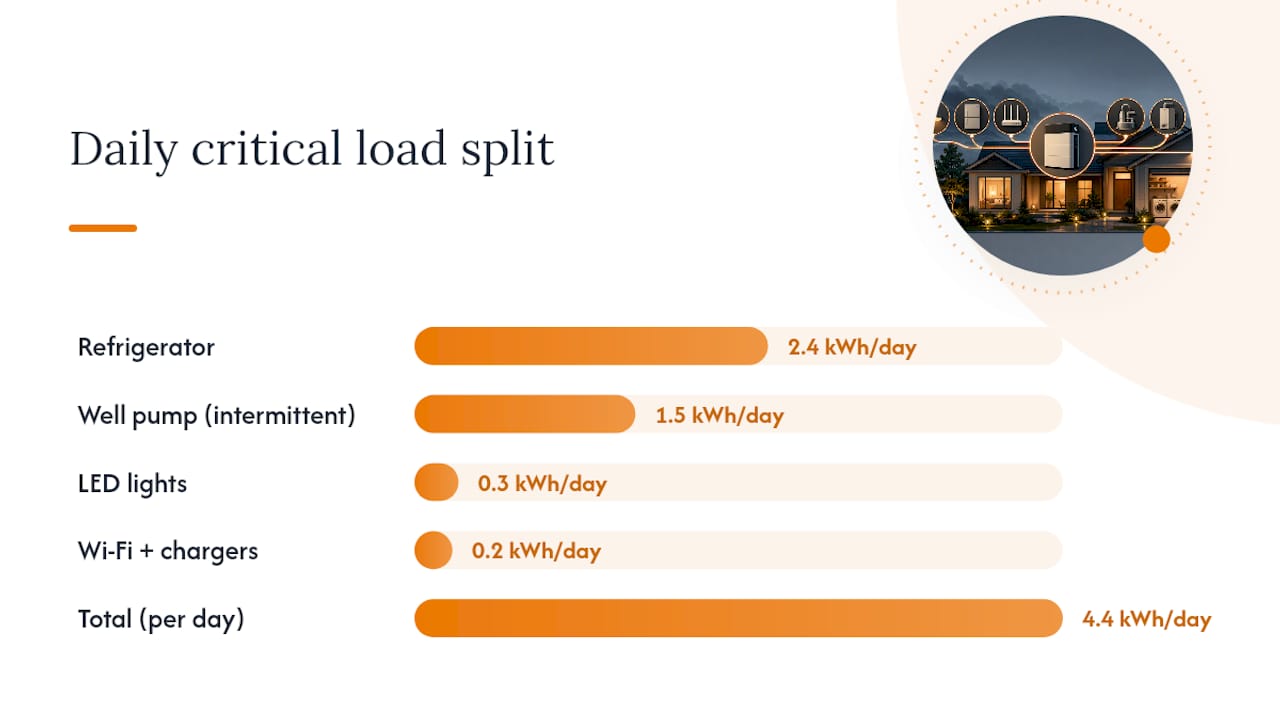
Here’s a worked example for a 48 hour outage: a fridge (2.4 kWh/day), a few LED lights (0.3 kWh/day), a Wi-Fi router and phone chargers (0.2 kWh/day), and a half-horsepower well pump running intermittently (1.5 kWh/day) adds up to about 4.4 kWh per day.
Statistic Callout: Battery systems paired with an automatic transfer switch commonly switch over in under 20 milliseconds, and online UPS configurations can achieve an effective 0 millisecond transition, fast enough that sensitive electronics never notice the grid went down.
If you’re sizing specifically for a well pump running on 3/4 HP, expect a surge demand of 5,000 to 6,000 watts, which is a detail a lot of DIY sizing calculators miss entirely.
Which Features Actually Matter for Storm Readiness?
Plenty of battery specs sound impressive on a sales sheet but do nothing for you during an actual blackout. Here’s what to prioritize instead.
- Automatic transfer switch (ATS) or a smart home panel. This is what detects the outage and switches your critical circuits to battery power without you flipping a single breaker, and the switchover speed determines whether your electronics even notice.
- Storm-ready mode. A growing number of systems can detect an incoming severe-weather alert and automatically top off the battery’s state of charge beforehand, so you’re not starting a storm at 60% capacity.
- Cold-weather performance. Lithium batteries lose usable capacity in freezing temperatures, and some models need indoor or insulated placement to perform reliably during winter storms.
- UL certification. Look for UL 9540 listing for energy storage systems, which confirms the equipment meets recognized safety standards for fire and electrical risk.
- Surge capacity. The system needs to handle the startup spike from motors, not just their steady running wattage.
- Modularity. Systems that let you add battery units later mean you’re not locked into today’s capacity estimate if your needs grow.
Pro Tip: Ask your installer for the system’s documented switchover time in writing, not just a marketing brochure figure. A gap of even a few hundred milliseconds can reset a computer or a smart thermostat, which matters if you work from home.
Placement matters more than most homeowners expect, too. Garages that see extreme heat, unconditioned attics, and anywhere prone to flooding are poor spots for battery equipment. A qualified installer will factor in ventilation, ambient temperature, and flood risk when recommending a location, which is exactly the kind of judgment call that separates a professional installation from a rushed one.
Can Solar, a Generator, or an EV Extend Your Backup Power?
Combining sources is how you turn a two-day backup into an indefinite one, but each pairing comes with its own rules.
Solar alone won’t power your home during a blackout, and this trips up more homeowners than you’d think. Grid-tied solar systems use anti-islanding protection, which automatically shuts the system down during an outage so it doesn’t feed electricity onto de-energized power lines and endanger utility crews. A homeowner in Florida learned this the hard way during Hurricane Milton, discovering that rooftop panels alone did nothing once the grid went down. Battery storage is what makes solar usable during a blackout, since the battery isolates your home’s circuits from the grid and lets stored solar energy flow to your critical loads.
Generators pair well with batteries when connected through a properly rated transfer mechanism, letting the generator recharge the battery bank while the battery instantly covers gaps in generator runtime, like refueling or maintenance.
EVs can serve as supplemental backup where vehicle-to-home (V2H) or vehicle-to-load (V2L) support exists, effectively turning your car into a very large battery. The catch is that not every EV or charger supports this yet, and the ones that do usually need dedicated hardware.
To stretch runtime further:
- Disable EV charging during an active outage to preserve battery capacity for household essentials.
- Use a smart panel to automatically shed non-critical circuits when battery levels drop.
- Stagger appliance use rather than running the AC, the dryer, and the well pump simultaneously.
If you’re weighing solar battery storage as part of a longer-term plan, storm backup and everyday bill savings often come from the same investment.
What Should You Expect During Installation, Permits, and Cost?
Getting a battery system installed isn’t a same-day job, and knowing the timeline upfront prevents a lot of frustration once storm season arrives.
Site assessment comes first. An installer checks your electrical panel’s capacity, identifies which circuits you want on backup, measures available space for the battery equipment, and confirms your main panel can handle the added load without an upgrade.
Permitting and inspection follow a set sequence. Most jurisdictions require a permit for battery installations, since they involve panel modifications. The general order is design, permit application, installation, then a final inspection before the system goes live. Realistically, this process runs anywhere from a few weeks to a couple of months depending on your local permitting office’s backlog.
Cost drivers vary by system type:
- Portable power stations run from a few hundred dollars into the low thousands, depending on capacity.
- Critical-load installed systems involve equipment cost, electrical labor, permit fees, and any panel upgrade work.
- Whole-home ESS installations cost more upfront but reduce how many circuits you have to sacrifice during an outage.
If you’re waiting on a professional installation, a portable power station is a smart bridge solution to keep essentials running in the meantime rather than going without backup entirely while permits process. Homeowners who also need panel work done, such as removing and reinstalling panels for roof repairs, should plan that work around the battery installation timeline rather than treating them as separate projects.
Your Pre-Storm and During-Storm Battery Checklist
A battery backup system only performs as well as your preparation, and most failures during real storms trace back to a step someone skipped, not a hardware problem.
- Charge to full as soon as a storm watch is issued, not after the warning.
- Enable storm-ready mode if your system has it, so it auto-tops-off charge ahead of the event.
- Label your circuits clearly at the panel so anyone in the household knows what’s backed up and what isn’t.
- Check generator fuel levels if you’re running a hybrid setup.
- Test your automatic transfer switch before storm season, not during it. A quick manual test confirms the switchover actually works.
- Prioritize loads once the power’s out. Run the fridge and essential lighting first; hold off on the dryer or window AC unless your capacity supports it.
- Stagger motor starts. Don’t fire up the well pump and the refrigerator compressor at the same moment; surge demand stacks fast.
- Monitor state of charge and battery temperature through your app or panel display so you’re not caught off guard by a sudden shutdown.
If anyone in your household relies on a medical device, document its exact wattage and daily runtime needs ahead of time and keep that paperwork with your emergency supplies, not buried in an email somewhere.
Pro Tip: Keep a written copy of your circuit priority list taped inside a kitchen cabinet. During a real outage at night, you don’t want to be squinting at a phone app to remember which breaker feeds the fridge.
After the storm passes, inspect your equipment for water intrusion or physical damage before recharging, and call a professional if anything looks off rather than troubleshooting electrical equipment yourself.
Why Professional Design Beats a DIY Battery Install
Homeowners underestimate how much can go wrong with a battery system that’s undersized or wired incorrectly, and it’s the part of this process I’d push back on hardest if I heard someone planning to skip it. An undersized system doesn’t just run out of power early. It can trip breakers unpredictably, shorten battery lifespan through deep discharge cycles, or fail exactly when a motor load surges, which is usually the worst possible moment.
DIY interconnection work carries real risk beyond inconvenience. Battery systems tie into your home’s main panel, and a poor connection can create fire hazards or void your equipment warranty outright. A professional installer runs an actual load study on your home rather than a back-of-envelope estimate, handles the permit process so you’re not stuck navigating your city’s inspection office alone, and stands behind the installation with a warranty that a DIY job simply doesn’t have.
A proper quote should include a detailed load analysis of your specific circuits, a clear permit and inspection workflow, and a realistic installation timeline, not a vague ballpark figure. If a quote skips the load study entirely, that’s worth questioning before you sign anything.
Alpha Solar Solutions built a Battery Backup Checklist for Homeowners specifically because so many storm-season calls come from people who bought equipment first and asked sizing questions second. Our backup protection page walks through what a proper installation actually includes, and it’s worth reading before you get quotes from anyone, including us.
— Anthony
Get a Storm-Ready Battery System Sized for Your Home
Everything above gives you the framework to estimate your own needs, but turning that estimate into a working system installed correctly is where Alphasolarsa comes in. We’re the team San Antonio homeowners call when they’re done guessing at wattage and ready for a real load study, a permit-handled installation, and a system sized for the outages that actually hit this region.
If you’re still unsure how long a given battery size would actually keep your home running, our breakdown on how long battery storage lasts walks through the same math with local examples. And if solar is part of your longer-term plan, pairing it with battery storage solves the anti-islanding problem covered earlier, letting your panels actually power your home when the grid goes down. Homeowners looking into EV ownership should also ask about EV charger installation while a battery system is being designed, since running both off one coordinated plan avoids costly rework later. For a broader look at energy management options in the region, Solar Energy Management is a helpful resource alongside our own guidance.
Ready to find out what size system your home actually needs? Request a quote from Alphasolarsa and get a load study built around your real circuits, not a generic estimate.
Sources
- Weather
- The Cooldown: Hurricane Milton exposed a costly solar myth for one Florida homeowner, prompting a battery build