
If someone in your home depends on powered medical equipment, start with a dedicated critical-load battery backup and an automatic transfer switch. Expand to whole-home backup only if you need multiple high-draw circuits running at once. Before you request quotes, confirm two numbers with any installer in writing: usable kWh (how long the system runs) and continuous kW (how much power it delivers at once). Then insist on a professional load survey and documented transfer behavior for your exact devices.
TL;DR:
- A critical-load subpanel is sufficient for households with one or two medical devices, while whole-home backup is necessary for multiple high-draw circuits and longer outages.
- Battery size should be calculated based on the total wattage of essential devices, desired runtime, buffer for inverter losses, and the inverter’s continuous watt rating.
- UL 9540 and UL 9540A certifications are essential for safety, but FDA or hospital-grade labels are not applicable or required for residential backup systems.
- Lithium iron phosphate batteries are the best choice for medical backup due to safety, longevity, and UL testing, whereas lead-acid batteries have significant downsides for ongoing reliability.
- Regular quarterly tests, proper training, and documented transfer procedures are critical to ensure backup availability and proper operation during emergencies.
Table of Contents
- Quick Checklist: Partial vs Whole-Home Backup — Which Fits You?
- How Does a Solar Battery Backup System Power Medical Devices?
- How Do You Calculate the Right Battery Size for Medical Devices?
- Critical-Load Subpanel or Whole-Home Backup: What’s the Tradeoff?
- What Certifications and Permits Should You Verify Before Installing?
- How Often Should You Test Your Medical Equipment Backup System?
- What Does a Battery Backup System Cost for Medical Needs?
- Are There FDA or Hospital-Grade Rules for Home Medical Backup Power?
- Which Battery Chemistry Is Best for Medical Equipment Backup?
- How Should You Set Up Alerts and Communication During an Outage?
- How Long Should Your Battery Run During an Extended Outage?
- What Training Do You Need to Manage the System During an Outage?
- An Editorial Take on Medical-Equipment Backup Priorities
- Alpha Solar Solutions: How We Approach Medical-Equipment Backup Projects
- Sources
Quick Checklist: Partial vs Whole-Home Backup — Which Fits You?
Before you call an installer, answer a few questions honestly. Your answers point you toward critical-load backup or a whole-home system, and they keep you from overbuying or underbuying protection for the devices that matter most.
- How often do outages hit your area, and how long do they usually last?
- Which devices absolutely cannot lose power, and what’s each one’s wattage?
- Do you also need refrigeration, well pumps, or HVAC running during an outage?
- What’s your realistic budget for this year versus a staged expansion later?
If your household runs one or two medical devices and occasional storm outages are your main concern, a critical-load subpanel covers you at a lower cost. If you’re running an oxygen concentrator, a ventilator, refrigeration for medications, and a well pump simultaneously, or outages regularly stretch past a day, whole-home backup earns its higher price tag. Many households on a tighter budget start with a dedicated backup subpanel and add capacity once the essentials are locked in.
How Does a Solar Battery Backup System Power Medical Devices?
A home battery backup system for medical equipment relies on four parts working together: the battery itself, an inverter or gateway that converts stored energy into usable power, a transfer switch, and either a dedicated subpanel or your full electrical panel. The gateway and load management hardware determine real-world performance as much as the battery’s size does.
- Battery: stores energy pulled from the grid or your solar panels.
- Inverter/gateway: converts DC battery power to the AC power your devices use, and manages how much continuous output is available.
- Transfer switch: detects a grid outage and switches your home to battery power, either instantly or with a short delay.
- Subpanel or main panel: determines which circuits actually receive backup power.
Standby battery systems can take several seconds to switch over, which is fine for a refrigerator but risky for a device with zero tolerance for interruption. If you run anything that behaves like life support, ask specifically whether the transfer switch is rated for near-instant, UPS-style switching. Solar panels can recharge the battery while your home is islanded from the grid, but only if the installer wires that capability in, as explained in Solar Battery Charging Explained for Home and Small Systems. Get that confirmed, not assumed.
How Do You Calculate the Right Battery Size for Medical Devices?
Sizing a battery backup system for medical equipment comes down to two separate calculations, and skipping either one leaves you exposed. Here’s the worksheet.
- List every device and its continuous wattage. A CPAP machine typically draws 30 to 60 watts; an oxygen concentrator can pull 300 to 600 watts continuously, more on startup.
- Add essential household draws. A refrigerator (100 to 800 watts, higher on compressor startup), medical refrigeration, and any well pump or sump pump you can’t do without.
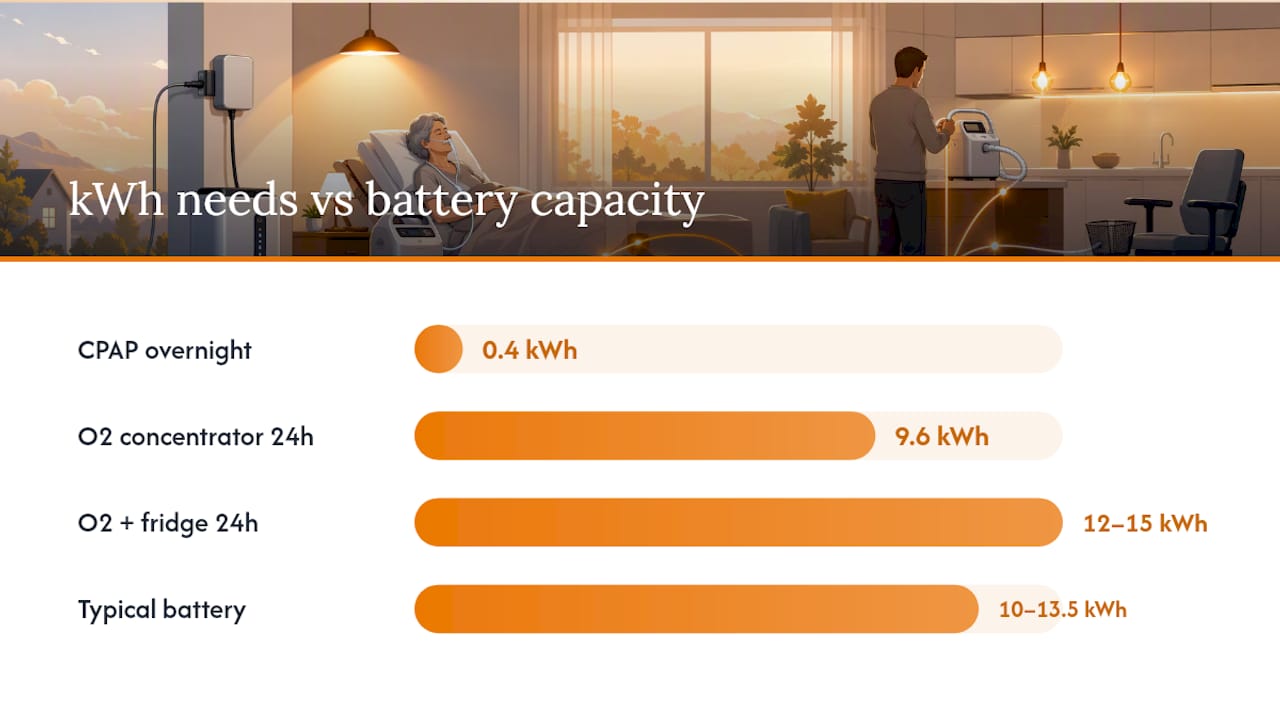
- Calculate required kWh for your target runtime. Multiply total watts by the hours you want covered, then divide by 1,000. A 400 watt oxygen concentrator running 24 hours needs roughly 9.6 kWh just for that device.
- Add a buffer for inverter losses and reserve capacity. Installers commonly build in 15 to 20% extra so the battery isn’t run to empty.
Sizing checkpoint: A single 10 to 13.5 kWh battery can power essential loads for one to two days without solar recharging; with a properly wired solar recharge, that runtime can extend indefinitely during daylight hours.
Two quick examples. A CPAP alone overnight (50 watts for 8 hours) needs about 0.4 kWh, trivial for almost any battery. But an oxygen concentrator plus a refrigerator running for 24 hours can require 12 to 15 kWh once you include startup surges and buffer. That’s the gap between “any battery will do” and “we need to size this carefully.”
Continuous kW matters just as much as kWh. A battery can hold plenty of stored energy and still fail if its inverter can’t deliver enough instantaneous power when the oxygen concentrator, refrigerator, and CPAP all draw at once. Sizing must account for both metrics before you sign anything.
Critical-Load Subpanel or Whole-Home Backup: What’s the Tradeoff?
A critical-load subpanel is a small secondary panel that relocates only the circuits you choose for backup, typically medical equipment, refrigeration, and a few outlets or lights. It’s the cost-effective way to guarantee your medical circuits stay powered without paying to back up your whole house. Whole-home backup ties in further upstream and powers every breaker in your panel, which means it needs a bigger battery, a higher continuous kW rating, and more coordination at the service entrance.
- Critical-load subpanel: lower cost, faster install, covers only pre-selected circuits.
- Whole-home backup: higher cost, more capacity needed, but nothing in the house goes dark.
- Smart panels with load-shedding can stretch a smaller battery further by automatically dropping non-essential circuits during an outage.
For households where medical needs override the usual cost tradeoffs, dedicated critical circuits should come first regardless of which path you eventually choose.
Pro Tip: Ask your installer to show you, on paper, exactly which breakers land on the critical-load panel and where the metering point sits relative to your main service. That single document prevents most disputes after installation.
Before you sign a contract, require written answers on which circuits are covered, where the discharge/metering point is located, and the exact transfer specifications for your equipment.
What Certifications and Permits Should You Verify Before Installing?
Certifications aren’t paperwork for paperwork’s sake here. UL 9540 covers energy storage system safety, and UL 9540A tests thermal runaway behavior, meaning how the battery responds if a cell fails. For a home running medical equipment, this isn’t optional homework.
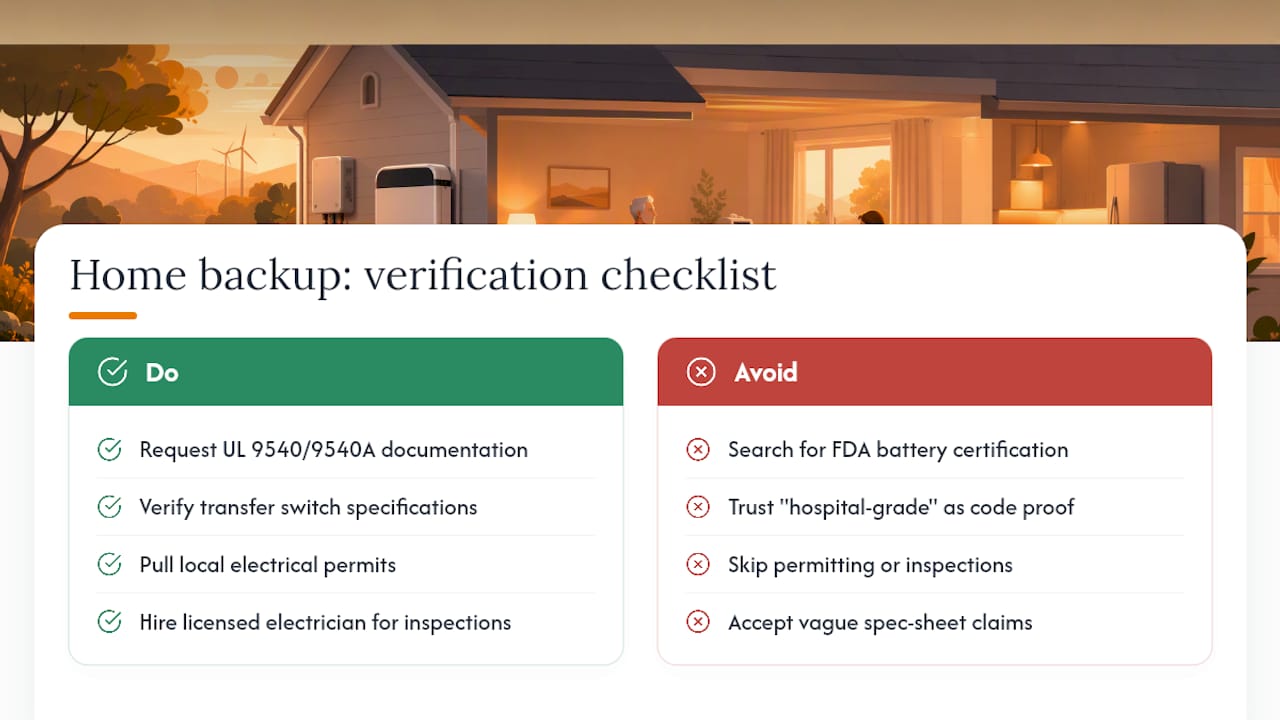
- Request UL 9540 and UL 9540A documentation along with specific inverter and gateway model numbers.
- Get the automatic transfer switch’s behavior and continuous-output (kW) rating confirmed in writing, not verbally.
- Confirm your municipality’s permits and inspections are filed, and that a licensed electrician is doing the work, not a subcontractor without local credentials.
- Ask about surge protection on the system and get documented emergency shutoff instructions plus a service contact number posted near your panel.
Skipping any of these steps is how homeowners end up with an underspecified system that looks fine on a spec sheet but can’t actually carry the load when the grid goes down.
How Often Should You Test Your Medical Equipment Backup System?
Test the full switchover quarterly, not just once at install. Simulate an outage, and record three things: how long the transfer actually took, whether every medical device stayed on without interruption, and the battery’s state of charge before and after the test.
- Trigger a simulated outage and time the switchover.
- Confirm every critical device (CPAP, oxygen concentrator, refrigeration) ran without a hiccup.
- Log battery state of charge and note any alarm or fault codes.
- Check that monitoring alerts (app or gateway notifications) fired correctly.
During an actual outage, conserve energy by limiting non-essential loads and keeping a battery backup checklist with spare cables, a backup CPAP battery, and contact numbers within reach.
What Does a Battery Backup System Cost for Medical Needs?
Budgeting for medical-grade backup starts with realistic numbers, not the smallest quote you can find. Published installer ranges show partial backup systems (10 to 15 kWh) running roughly $12,000 to $16,000 installed, while whole-home systems (20 to 30+ kWh) typically land at $22,000 to $30,000 or more before incentives, according to installer pricing data.
That gap is exactly why medical need should steer where your first dollars go. Guaranteeing the medical circuit matters more than covering every outlet in the house.
- Start with a critical-load subpanel sized to your actual medical and refrigeration loads.
- Plan a staged expansion to whole-home coverage once budget allows, rather than overextending on day one.
- Avoid the cheapest bid on the table. Underspecified continuous-output ratings or missing UL documentation cost far more to fix later than to spec correctly up front.
This article doesn’t cover specific tax incentives, since federal solar tax credit policy has changed and readers should confirm current eligibility directly with a tax professional rather than relying on outdated figures.
Are There FDA or Hospital-Grade Rules for Home Medical Backup Power?
Home medical equipment itself, CPAP machines, oxygen concentrators, and infusion pumps, falls under FDA device regulation, but the FDA doesn’t regulate the home battery backup system that powers them. There’s no FDA certification for a residential battery or inverter. The safety standard that actually governs your backup equipment is UL 9540 for the energy storage system and UL 9540A for its fire and thermal-runaway testing. That’s the paperwork to demand, not a medical device clearance.
Hospitals run on a different regulatory tier entirely, with mandated generator redundancy, load testing schedules, and code requirements that don’t apply to a private residence. Don’t let a contractor imply that “hospital-grade” language on a spec sheet means anything specific for your home installation. It’s marketing shorthand, not a code standard.
What does apply to your home: local electrical permitting, National Electrical Code requirements for transfer equipment, and your utility’s interconnection rules if the system ties into solar. A licensed electrician pulling permits and scheduling inspections is your actual compliance path. If your physician has documented that a device is medically necessary, keep that paperwork on file. It won’t change the electrical code requirements, but it helps you prioritize which circuits get backup first and can support insurance or utility outage-priority programs in some areas.
The takeaway for homeowners: skip the search for medical-grade battery certification that doesn’t exist for residential systems, and focus your verification energy on UL 9540/9540A documentation, transfer switch specs, and proper permitting instead.
Which Battery Chemistry Is Best for Medical Equipment Backup?
Almost every home battery backup system installed today uses lithium iron phosphate (LFP), a lithium-ion chemistry variant chosen specifically for its safety profile. LFP batteries are more thermally stable than older lithium chemistries, degrade slowly over thousands of charge cycles, and carry the UL 9540A testing that matters for in-home installation. For a household relying on backup power for medical devices, that stability is worth prioritizing over marginal cost savings.
Lead-acid batteries, the older technology, still show up in budget quotes and off-grid setups. They’re cheaper upfront but carry real downsides for medical use: lower usable capacity relative to their physical size (you typically can’t discharge them below 50% without shortening their lifespan), shorter overall lifespan, and a need for ventilation due to gassing during charging. For a device that has to work every single time the power drops, that reduced margin for error is a real liability.
Some installers also mention nickel-based or saltwater battery chemistries. These remain uncommon in residential backup and generally lack the track record and certification depth that lithium iron phosphate systems have built up. Unless you have a specific reason to consider them, they’re not worth the added uncertainty for a medical-priority installation.
The practical guidance: ask what chemistry is in the battery you’re quoted, confirm it’s LFP if medical reliability is your top priority, and treat any pitch for lead-acid as a budget compromise you’re making with your eyes open, not a comparable alternative.
How Should You Set Up Alerts and Communication During an Outage?
A battery backup system only helps if you know it’s working, and know the moment something’s wrong. Most modern battery gateways include an app that shows state of charge, active loads, and fault alerts in real time. Set those notifications to your phone before you ever need them in an emergency, not during one.
Beyond the battery’s own app, layer in a few redundant systems. A cellular based alert (not solely Wi-Fi dependent, since your router may also be on battery power and could fail if that circuit isn’t backed up) ensures you get notified even if home internet drops. Some households pair their battery monitoring with a medical alert pendant or a caregiver notification system, particularly when the person relying on the equipment lives alone or has limited mobility to respond to an alarm themselves.
Practical setup checklist:
- Confirm the battery’s monitoring app pushes alerts to at least two people’s phones, not just one.
- Verify your Wi-Fi router and internet modem are on the backed-up circuit if your alert system depends on them.
- Keep a physical, printed emergency contact list near the electrical panel in case phones are unreachable.
- Test that low-battery and fault alerts actually fire during your quarterly switchover test, not just during normal operation.
If you’re on a utility program for medical-priority outage restoration, keep that documentation current and make sure the utility has your correct account information. That won’t power your CPAP, but it can shorten how long you’re relying on battery reserves in the first place.
How Long Should Your Battery Run During an Extended Outage?
Multi-day outages, the kind that follow major storms, are where sizing decisions either hold up or fall apart. A single properly sized battery can cover essential loads for one to two days without any solar input at all, and with solar recharging working correctly, that runtime can extend indefinitely during daylight hours. The catch is that “correctly configured” solar recharge isn’t automatic. Confirm with your installer that your specific system can recharge from panels while islanded from the grid, since not every setup is wired for that.
For outages beyond 48 to 72 hours, tiered planning matters more than a bigger battery alone. A layered approach, battery for the first day or two, solar recharge extending coverage through sustained daylight, and a generator as backup for extended multi-day failures, gives you redundancy that a single technology can’t. Preparedness guidance for medical device owners commonly recommends planning for at least 72 hours of coverage as a baseline, not an edge case.
To stretch runtime during an actual extended outage: shut off non-essential loads immediately (space heaters, secondary refrigerators, pool pumps), rely on natural light during the day instead of running lighting circuits, and check your battery’s monitoring app periodically rather than constantly, since checking itself uses negligible power but panic-checking wastes attention you need elsewhere. Smart panels with automatic load-shedding handle this prioritization for you, which is worth the added cost if your household includes someone dependent on continuous powered equipment.
What Training Do You Need to Manage the System During an Outage?
The best-sized battery backup system fails if nobody in the house knows how to operate it under stress. Every household running medical equipment on backup power needs at least two people trained on the basics, not just the person who signed the contract.
Training should cover four things: how to check the battery’s state of charge and read the app or panel display, how to manually trigger a transfer if the automatic switch doesn’t fire, how to identify and respond to a fault or alarm code, and who to call, both the installer’s emergency line and the device manufacturer’s support number, if something isn’t working as expected.
Write this down. A one-page protocol taped near the electrical panel, listing device wattages, the battery’s emergency shutoff location, and step-by-step instructions for manual transfer, removes the need to remember any of this during an actual emergency when stress is high and time matters. Include your installer’s after-hours contact number on that same page.
Run through the protocol as a household at least once after installation and again at each quarterly test, not just once at the walkthrough. If your caregiving situation involves rotating family members or hired help, make sure new people get walked through the same basics before they’re on their own during an outage. A system that works perfectly on paper but that nobody in the house knows how to operate is functionally no better than having no backup at all.
An Editorial Take on Medical-Equipment Backup Priorities
Most guidance treats battery backup sizing as an engineering exercise, kWh here, kW there, and hands the homeowner a spreadsheet. That’s backward for a household with medical equipment on the line. The engineering matters, but the real failure point isn’t math, it’s homeowners accepting verbal assurances instead of written specs, then discovering during an actual outage that the transfer switch takes longer than expected or the continuous output can’t handle the oxygen concentrator and the refrigerator at once.
The industry also oversells whole-home backup to households that don’t need it yet. A critical-load subpanel sized correctly and installed with documented UL 9540A compliance protects what matters most, often at half the cost of a whole-home system that mostly backs up circuits nobody’s life depends on. Expansion can come later. What can’t come later is the first outage after a poorly specified install.
— Anthony
Alpha Solar Solutions: How We Approach Medical-Equipment Backup Projects
Alpha Solar Solutions treats a medical-equipment backup request differently from a standard battery quote. Our evaluation starts with a load worksheet built around your specific devices, then moves to a design decision, dedicated critical-load subpanel or whole-home, based on what those devices actually require. Every install includes documented UL 9540A verification, permit handling, and a full switchover test before we consider the job finished.
Before your evaluation visit, take a few photos of your medical devices’ model numbers or wattage labels and snap a picture of your breaker panel. That alone speeds up the load survey significantly.
If someone in your home depends on powered medical equipment, this isn’t a project to defer. Our residential solar and battery installation service in the San Antonio area starts with that same load worksheet and gives you written transfer-time and continuous-output specs before you sign anything. Schedule an evaluation and you’ll walk away with real numbers, not guesses, on what your household needs.
Sources
The sizing math and certification guidance above draw on published installer cost data, UL testing standards, and medical-preparedness guidance. For a step-by-step reference, see Alpha Solar’s installation workflow guide and battery backup checklist.
- Solar Battery Backup for Medical Equipment 2026 Picks | Sun Supply PV
- Whole-Home vs Partial Backup Solar: Battery Sizing Guide (2026) | SurgePV