

For most homeowners, the ChargePoint Home Flex is the safer buy right now because of its active vendor support and adjustable amperage, while the JuiceBox line still appeals to buyers chasing utility demand-response credits. If long-term software support and warranty peace of mind matter more to you than a slightly lower price, Home Flex is your pick.
TL;DR:
- The ChargePoint Home Flex offers active support, firmware updates, and flexible amperage, making it a better long-term investment for most homeowners.
- The JuiceBox models target specific use cases, with the 40A version suited for low-mileage drivers and the 48A version for utility demand-response participation.
- Installation costs vary between $300 and $1,500, with an adjustable charger like the ChargePoint Home Flex providing more flexibility for future EVs or limited panel capacity.
- Both chargers support scheduling and demand-response, but ChargePoint’s app provides a superior user experience and wider public network access.
- Cold-weather performance and long-term support are better with the ChargePoint, as JuiceBox cables stiffen in freezing conditions and support concerns have been raised after company shifts.
Table of Contents
- JuiceBox vs ChargePoint: Quick Comparison by Buyer Type
- Installation Options, Amperage, and Real Charging Speed
- Smart Features: Apps, Scheduling, and Grid Rewards
- Build Quality, Cold Weather, and Warranty Coverage
- Price Ranges and Whether Extra Amps Are Worth It
- How to Choose the Right Charger for Your Garage
- What Installers Actually See on the Job
- Payment Options and Pricing at Public Chargers
- What Real Owners Say About Reliability
- Author Perspective: What I’d Tell Most Homeowners
- Getting an EV Charger Installed the Right Way
- Sources
JuiceBox vs ChargePoint: Quick Comparison by Buyer Type
Not every EV owner needs the same charger, and that’s really what this decision comes down to. Before you get into amperage charts and app screenshots, it helps to know which buyer profile you fall into.
The JuiceBox 40 suits the commuter who drives under 40 miles a day and just wants a dependable overnight top-off without paying for capacity they’ll never use. The JuiceBox 48 fits the household that wants slightly faster charging and is enrolled (or plans to enroll) in a utility demand-response program, since JuiceNet’s grid integration is genuinely one of the strongest features in this category. The ChargePoint Home Flex is built for the long-range driver or the two-EV household that wants flexibility. Its adjustable 16 to 50A output means one charger can serve a Nissan Leaf today and a faster-charging EV later without buying new hardware.
The decision-driving differences break down like this:
- Fixed vs adjustable amperage: JuiceBox models ship at a set amperage; ChargePoint Home Flex adjusts across a 16 to 50A range.
- App ecosystem vs grid features: JuiceBox leans on JuiceNet demand-response; ChargePoint leans on its public charging network integration.
- Vendor support: ChargePoint remains in active development; JuiceBox has faced support concerns after company changes.
Installation Options, Amperage, and Real Charging Speed
Charging speed comes down to amps multiplied by volts, and on a 240V home circuit, that math matters more than any marketing claim. The JuiceBox 40 delivers a fixed 40A charge, about 9.6 kW, while the JuiceBox 48 steps up to 48A. The ChargePoint Home Flex covers the whole range, adjustable from 16A up to 50A, so an electrician can dial it to match your panel’s spare capacity instead of forcing a rewire.
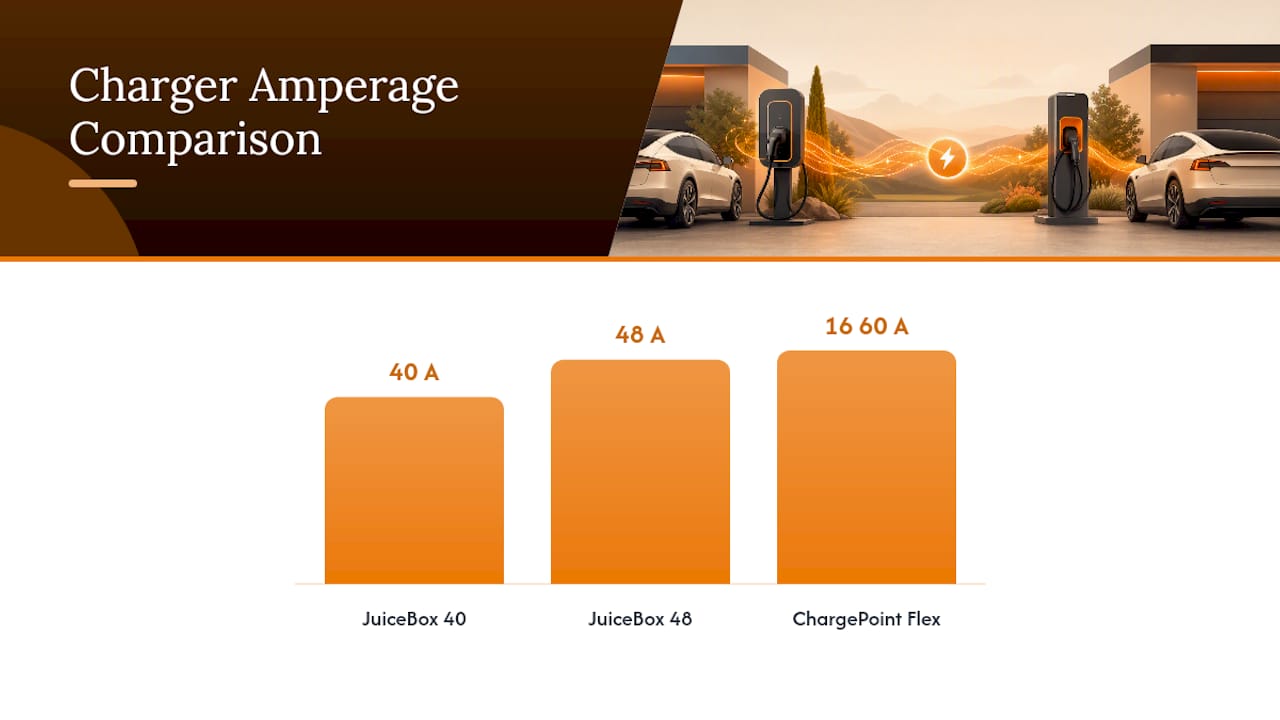
In practical terms, a 40A charger adds roughly 25 to 30 miles of range per hour for most EVs, while 48 to 50A pushes that closer to 30 to 37 miles per hour, depending on the vehicle’s onboard charger. For most daily driving patterns, the gap between 48A and 50A is barely noticeable overnight unless you’re running two EVs off one circuit.
Installation follows two paths:
- Plug-in (NEMA 14-50): Faster to install, and you can unplug the unit if you move.
- Hardwired: No plug to fail, generally preferred for outdoor installs, but it requires a licensed electrician and a permit.
Expect installation costs between $300 and $1,500, with the high end reserved for homes needing a panel upgrade. Both chargers use the standard J1772 connector, and Tesla owners can charge either model using the NACS-to-J1772 adapter that ships with newer Tesla vehicles.
Pro Tip: Ask your electrician for a load calculation before you buy anything. Panel spare capacity, not charger amperage, is usually what decides your real installation cost.
Smart Features: Apps, Scheduling, and Grid Rewards
Both brands built genuinely capable apps, but they optimize for different things. JuiceBox’s JuiceNet platform supports scheduling, demand-response, and power sharing, which lets your utility send a signal to pause or throttle charging during peak grid stress, sometimes in exchange for a bill credit. That’s a real financial perk if your utility runs a demand-response program, though enrollment rules vary by provider.
ChargePoint takes a different angle. Its app doubles as access to the public ChargePoint network, so the same login you use at home also unlocks stations across North America when you’re traveling. Forbes’ side-by-side testing also gave ChargePoint’s app the edge for polish and adjustable amperage control.
Feature comparison at a glance:
- Time-of-use scheduling: Both apps let you shift charging to off-peak hours to cut electricity costs.
- Demand-response credits: JuiceNet has the stronger track record here.
- Public network access: ChargePoint wins outright since JuiceBox has no equivalent public network tie-in.
- App usability: Forbes rated ChargePoint’s interface as the more refined of the two.
Build Quality, Cold Weather, and Warranty Coverage
Cold weather is where the two chargers actually diverge in a way that matters. InsideEVs put both through winter testing and found the JuiceBox cable performed the worst in deep-freeze conditions among the chargers they reviewed, with stiffening that made handling awkward in sub-freezing garages.
Cord length is a smaller but still real difference. JuiceBox units commonly ship with a 25-foot cable versus roughly 23 feet on Home Flex, which can matter if your panel sits far from where you park.
Support snapshot: Both chargers carry a standard multi-year manufacturer warranty, but only one has confirmed active development behind it. InsideEVs reported support concerns following changes at Enel X, while ChargePoint continues shipping firmware updates and expanding its network.
The practical fallout: a charger losing cloud support still charges your car. What disappears is scheduling, remote monitoring, and future firmware fixes, since the hardware keeps functioning as a basic Level 2 charger even without the app layer.
Price Ranges and Whether Extra Amps Are Worth It
Street prices for both brands sit in a tight band, generally $549 to $799 depending on model and retailer. Add your installation cost on top, and total spend typically lands between $850 and $2,300 for most homes.
A few things to weigh before you decide where those dollars go:
- JuiceBox 40: The budget-friendly entry point if your driving is modest and you don’t need adjustable output.
- JuiceBox 48: Worth the upgrade mainly if your utility rewards demand-response participation.
- ChargePoint Home Flex: Costs a bit more but pays you back in flexibility, since one unit adjusts to fit almost any panel or future EV.
- Discontinued-model risk: Buying a smart charger with uncertain long-term support means accepting that firmware and app features may stop improving, even though the hardware keeps working.
If your panel has generous spare capacity, the extra amps on Home Flex won’t change your daily routine much. If it’s tight, adjustable output lets an electrician configure the charger without a full panel upgrade.
How to Choose the Right Charger for Your Garage
Work through this before you call an installer:
- Calculate your daily miles. Under 40 miles rarely needs more than 32A of continuous draw.
- Check your panel’s spare capacity. A load calculation tells you whether you need 40A, 48A, or the flexibility of an adjustable unit.
- Consider outdoor exposure. If the charger will hang outside uncovered, prioritize a model with proven cold-weather cable performance.
- Decide how much you value smart-grid credits versus network access. JuiceNet rewards demand-response; ChargePoint rewards travelers.
When you talk to an electrician, ask directly:
- Does my panel need a load calculation or upgrade before installation?
- Will you pull a permit, and is mounting height code-compliant for my garage or exterior wall?
- Does a plug-in NEMA 14-50 setup cost less than hardwiring here, and what’s the tradeoff?
Pro Tip: If your installer can’t tell you your panel’s spare amperage off the top of their head, ask them to run the load calculation before signing anything. That number decides your real budget, not the charger’s price tag.
Red flags to avoid: a smart charger with no active firmware updates, or any unit whose cold-weather cable reviews mention stiffening and cracking risk in your climate.
What Installers Actually See on the Job
Alpha Solar Solutions installs EV chargers across San Antonio, and the same issues come up on almost every outdoor job: cable routing that ignores sun exposure, and mounting height that looks fine on paper but is awkward once the vehicle’s parked. A properly routed and weatherproofed outdoor installation protects the cable and connector from the exact cold and heat cycling that shortens a charger’s life.
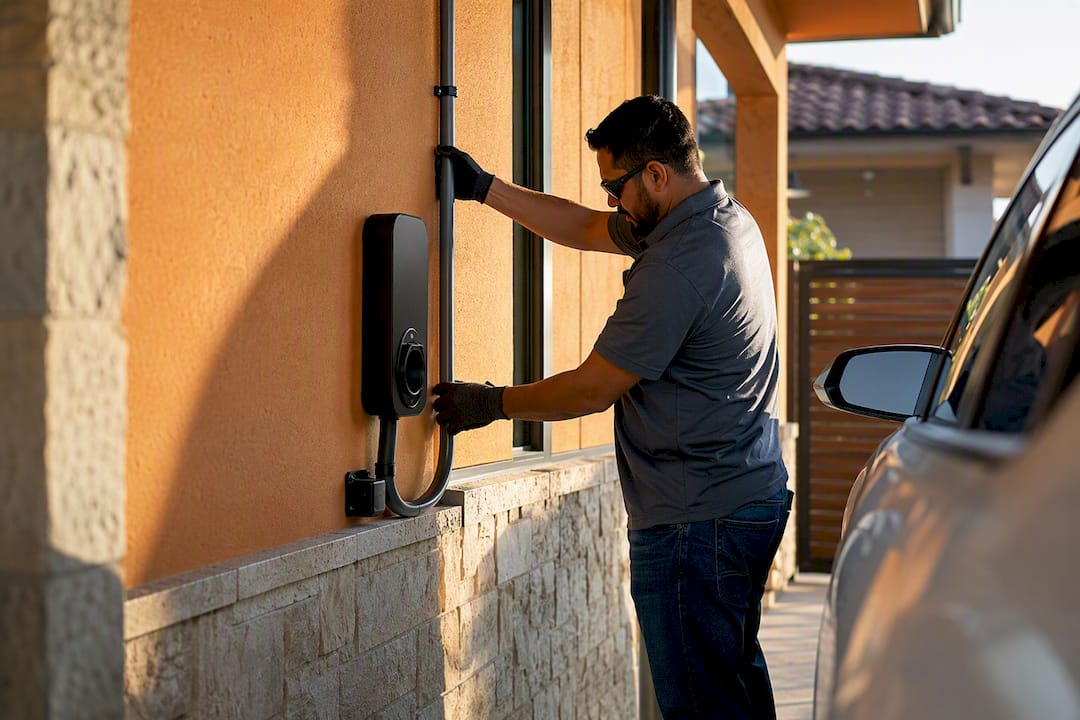
Panel upgrades come up more than homeowners expect, especially in older homes running a 100-amp service. Our electricians run a load calculation first, every time, because guessing at spare capacity is how homeowners end up paying twice: once for the charger, and again for a mid-installation panel swap nobody planned for.
Payment Options and Pricing at Public Chargers
Public charging works differently from the flat-rate simplicity of home charging, and it catches new EV owners off guard. Most networks, including ChargePoint’s public stations, offer both pay-as-you-go access through a mobile app or tap-to-pay card, and membership plans that lower the per-kWh or per-minute rate in exchange for a monthly fee.
Pricing structures vary by station and sometimes by state regulation. Some chargers bill per kWh delivered, others bill per minute connected, and a few still charge a flat session fee regardless of how much energy you actually use. ChargePoint’s home charger app gives you visibility into these public rates before you plug in, which is a real advantage over a charger with no network tie-in at all. JuiceBox owners without JuiceNet’s network access typically rely on a separate app, like Plugshare or the charging network’s own app, to locate and pay at public stations.
If you road-trip often, factor this into your decision. A charger with built-in public network access saves you from juggling three or four separate charging apps on a single trip.
What Real Owners Say About Reliability
Owner feedback across both brands tends to split along the same lines the professional reviews do. JuiceBox owners consistently praise the JuiceNet scheduling features and demand-response credits, but a recurring complaint involves app responsiveness and uncertainty about long-term support since Enel X’s changes.
ChargePoint owners report fewer support complaints, and the Home Flex’s adjustable amperage draws consistent praise for making the charger feel less like a one-size-fits-all product. Forbes’ hands-on comparison echoed this, noting ChargePoint’s app polish as a meaningful day-to-day difference, not just a spec-sheet detail.
Reliability complaints for both brands cluster around firmware updates occasionally causing temporary connectivity hiccups, a common growing pain across smart EVSE hardware generally, not unique to either brand. Neither charger shows a pattern of major hardware failure in the reviews available. The bigger risk factor is software continuity, not physical durability. If you’re weighing a charger built for a two-EV future, it’s also worth reading up on Level 1 versus Level 2 charging needs before committing to any specific amperage tier.
Author Perspective: What I’d Tell Most Homeowners
If you’re a daily commuter with modest mileage, buy the JuiceBox 40 and stop overthinking it. If you’re planning around a second EV or a longer commute, pay the small premium for the ChargePoint Home Flex and its adjustable amperage. Either way, your installer handles the NACS adapter question for Tesla owners, so compatibility shouldn’t be the deciding factor.
— Anthony
Getting an EV Charger Installed the Right Way
Choosing between JuiceBox and ChargePoint only solves half the problem. The other half is making sure your panel, wiring, and mounting setup match the charger you pick, and that’s where a rushed install turns a good charger into a service call six months later.

Alpha Solar Solutions handles EV charger installation in San Antonio from load calculation through permitting, mounting, and final electrical hookup, whether you’re going hardwired or plug-in. If you’re already generating your own power, our team can also help you time EV charging around solar production to get more mileage out of every kilowatt-hour your panels produce. Request a site visit and we’ll tell you exactly what your panel can support and what the job will cost before any work begins.
Sources
- The Enel-X JuiceBox EV Charger Ultimate Review
- ChargePoint Flex Vs. Enel X JuiceBox 40 – Which Do You Want In Your Garage?
- JuiceBox Vs ChargePoint Home Flex: 2026 In-Depth Comparison : Electrical Engineering Hub
- JuiceBox 48 vs ChargePoint Home Flex 2026 | OhmSnap