

TL;DR:
- Solar monitoring apps help homeowners track energy production, detect faults early, and protect their solar investments.
- They collect real-time data, process it in the cloud, and provide alerts and performance charts on your phone.
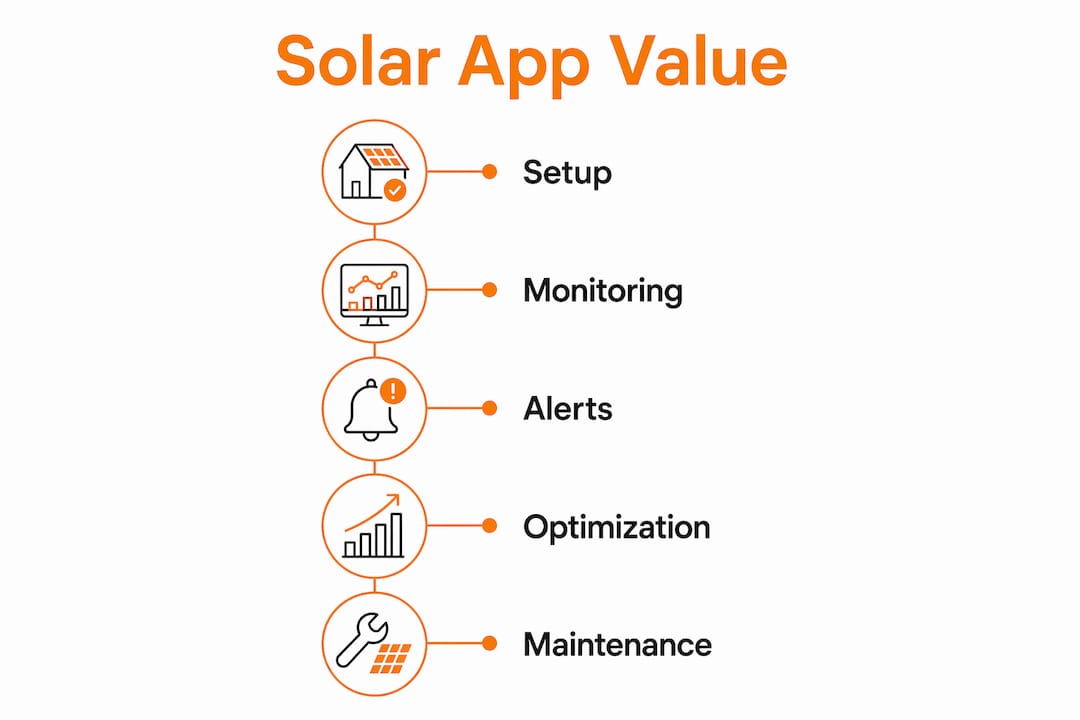
Solar monitoring apps are the primary tool homeowners use to track energy production, catch faults early, and protect the value of their solar investment. The role of monitoring apps in solar energy systems goes far beyond displaying a number on a screen. These apps collect real-time data from your panels and inverter, process it in the cloud, and deliver clear alerts and performance charts directly to your phone. Without them, production losses of 10–30% can build up for months before you ever notice a problem on your electricity bill.
How do solar monitoring apps work to track energy production?
Solar monitoring apps collect data at three possible levels: the full system, individual strings of panels, or each panel on its own. The data source is your inverter, microinverter, or power optimizer. Each device measures voltage, current, and energy output, then sends that data to a cloud server over Wi-Fi or Ethernet.

Once the data reaches the cloud, the platform processes it and displays the results on a dashboard you can access from your phone or browser. Dashboards include charts, gauges, and alert notifications showing both system-wide and panel-level output. You can see how much energy your system produced today, this month, or over the past year.
The difference between system-level and module-level monitoring is significant. System-level monitoring shows your total output. Module-level monitoring, enabled by microinverters or power optimizers, shows exactly which panel is underperforming. Module-level data helps identify shading issues, wiring damage, or a defective panel within hours instead of months.
Activating system monitoring takes about 10–15 minutes during installation and is typically offered free by inverter manufacturers through cloud-connected apps. Platforms like Enphase Enlighten, SolarEdge Monitoring Portal, Fronius Solar.web, and Huawei FusionSolar are the most widely used in residential installations today.
What are the key benefits of using solar monitoring apps for homeowners?
The financial case for monitoring is direct and measurable. Here are the core benefits you get from using a solar monitoring app consistently:
-
Early fault detection. Unmonitored systems lose 3–8% of generation from undetected faults, and performance drops often reach 10–30% before a homeowner notices. Monitoring catches these issues months earlier.
-
Faster maintenance resolution. Proactive monitoring resolves faults 3–6 months faster than waiting for a high electricity bill to signal a problem. That speed directly reduces lost production.
-
Lower maintenance costs. Predictive maintenance through monitoring can save 8–12% compared to scheduled preventive maintenance, and up to 40% compared to reactive repairs after a failure.
-
Better understanding of your energy patterns. You can see exactly when your system produces the most power and how your household consumes it. That visibility helps you make smarter decisions about when to run appliances.
-
Support for system upgrades. Historical performance data tells you whether adding panels or a battery makes financial sense. Without that data, you are guessing.
-
Warranty and insurance support. A documented performance history strengthens any warranty claim or insurance case if equipment fails.
Pro Tip: Check your monitoring app weekly for the first three months after installation. That habit builds your understanding of normal performance and makes it much easier to spot something unusual later.
The benefits of solar monitoring compound over time. A system you watch closely performs better, lasts longer, and pays back faster than one you ignore.
What features should homeowners look for in a solar monitoring app?
Not all monitoring apps deliver the same level of detail. When evaluating your options, focus on these features:
- Automated alerts. The app should notify you immediately when output drops below a threshold or a fault is detected. Many homeowners activate a monitoring app but never configure alerts, which eliminates the most valuable early-warning benefit.
- Panel-level data. Module-level monitoring gives you granular performance insights that system-level monitoring cannot. If one panel fails, you want to know which one.
- Real-time updates. Data refreshed every 5–15 minutes gives you an accurate picture of current production. Hourly updates are less useful for fault detection.
- Historical data storage. You need at least 12 months of data to establish a reliable performance baseline. Longer storage periods support better trend analysis.
- Smart home integration. Some apps connect with home energy management systems, allowing you to automate when high-draw appliances run based on solar production levels.
- User-friendly dashboard. Charts and gauges should be readable at a glance. If you need a manual to understand the screen, the app is not doing its job.
| Feature | Why it matters |
|---|---|
| Automated alerts | Catches faults before they become costly production losses |
| Module-level monitoring | Identifies the exact panel causing underperformance |
| Historical data storage | Builds a baseline for diagnosing slow degradation |
| Smart home integration | Automates load shifting to peak solar hours |
| Real-time updates | Provides accurate, timely production data |
Entry-level apps tied to basic string inverters typically offer system-level data only. If you want panel-by-panel visibility, you need a system built around microinverters or power optimizers from the start.
How can homeowners maximize the value of their solar monitoring app?
Viewing your data is the starting point, not the finish line. Getting full value from your monitoring app requires a few consistent habits.
Set up alerts on day one. Configure fault alerts and underperformance thresholds before you leave the installation appointment. This single step is the most effective thing you can do to protect your system.
Use peak production hours for high-energy tasks. Shifting activities like laundry or EV charging to peak solar hours, typically 10 AM to 3 PM, reduces your grid dependency and increases your savings directly. Your monitoring app shows you exactly when those peak hours occur for your specific roof and location.
Build your performance baseline in year one. Establishing a baseline during the first year is critical. Without it, slow degradation in year three or four is nearly impossible to diagnose accurately. Your baseline also supports warranty claims if output drops unexpectedly.
- Review your monthly production totals and compare them to the same month last year.
- Note any days with unusually low output and check for shading, weather, or equipment issues.
- Contact a service professional when an alert fires and the cause is not obvious from the app data.
Pro Tip: Solar monitoring apps show you what is happening. Smart energy management systems automate your response. If you want to go further than manual load shifting, ask your installer about home energy management integration during your next service visit.
Understanding the difference between monitoring and control helps you set realistic expectations. Monitoring gives you the data. Acting on that data is what drives savings.
Key takeaways
Solar monitoring apps are the most direct tool homeowners have for protecting production, catching faults early, and getting full value from their solar investment.
| Point | Details |
|---|---|
| Early fault detection | Unmonitored systems can lose 10–30% of production before a homeowner notices. |
| Configure alerts immediately | Most homeowners skip alert setup, missing the app’s most valuable feature. |
| Module-level monitoring | Panel-by-panel data identifies exact faults faster than system-level data alone. |
| Build a year-one baseline | First-year data is the reference point for diagnosing all future performance issues. |
| Load shifting saves money | Moving laundry and EV charging to peak solar hours reduces grid dependency directly. |
Why monitoring is the feature most homeowners underuse
I have seen a lot of solar systems in San Antonio, and the pattern is consistent. Homeowners spend months researching panel brands and inverter types, then install a monitoring app and never open it again after the first week. That is the single biggest missed opportunity in residential solar.
The data your app collects is not just interesting. It is your evidence. When a panel starts degrading slowly, your utility bill will not tell you for six months or more. Your monitoring app will tell you in days, if you have alerts configured. That difference in response time is the difference between a minor service call and a significant production loss.
The other thing I want homeowners to understand is that module-level monitoring is worth asking about before you sign an installation contract. Not every system includes it by default. If your installer quotes you a string inverter with no power optimizers or microinverters, you are getting system-level data only. That is fine for basic tracking, but it will not tell you which panel is underperforming when something goes wrong.
Monitoring apps turn your solar system from a passive rooftop fixture into an asset you can actually manage. Use them that way.
— Anthony
Alphasolarsa makes monitoring part of every installation
Every residential solar installation Alphasolarsa completes in San Antonio includes monitoring setup and configuration as part of the process. We walk you through your app, set up your alerts, and make sure you leave with a working dashboard before we close out the job.
Alphasolarsa also offers solar panel cleaning services to keep your panels producing at full capacity, because clean panels and accurate monitoring data work together. If your monitoring app flags an underperforming panel and cleaning is the fix, we can handle that too. Reach out to Alphasolarsa to learn how we build monitoring into every system we install.
FAQ
What is the role of monitoring apps in solar systems?
Solar monitoring apps track real-time energy production, detect faults, and alert homeowners to underperformance. They are the primary tool for protecting solar output and reducing maintenance costs.
How do solar monitoring apps detect faults?
Apps compare current output against expected performance baselines and fire alerts when production drops below a set threshold. Software-based detection identifies problems 3–6 months earlier than manual bill reviews.
What is the difference between system-level and module-level monitoring?
System-level monitoring shows total output for the whole array. Module-level monitoring, enabled by microinverters or power optimizers, shows output for each individual panel and pinpoints exactly which one is underperforming.
How often should I check my solar monitoring app?
Weekly reviews are enough for most homeowners once you have alerts configured. During the first year, more frequent checks help you build a reliable performance baseline.
Do I need to pay for solar monitoring?
Most inverter manufacturers provide cloud-connected monitoring apps at no extra cost. Platforms like Enphase Enlighten and SolarEdge Monitoring Portal are included with compatible inverter purchases.