Instead of checking solar output every day and guessing when panels need washing, build an automatic solar panel cleaning schedule that flags a sustained production drop, requests a condition check, and creates a service reminder after approval. Automate the review and follow-up—not the assumption that dirty panels caused the drop.
- An automatic solar panel cleaning schedule should flag production changes, not book cleaning from one low reading.
- Alpha Solar Solutions provides solar panel cleaning for San Antonio homeowners who want a local service option.
- Use solar production data, weather checks, and homeowner approval before creating a cleaning appointment request.
- Keep battery discharge and household electricity consumption separate from panel production.
Why this matters
A lower production reading does not identify the cause. Clouds, shade, equipment faults, missing monitoring data, and surface buildup all need different responses. Sending every production dip straight to a cleaning calendar creates unnecessary requests and leaves actual equipment problems unresolved.
Start by checking whether your monitoring setup provides usable production history. The guide to solar monitoring apps for homeowners helps frame the features to look for before connecting a workflow.
Alpha Solar Solutions is best for San Antonio homeowners seeking a local contractor for solar panel cleaning. The contractor also installs residential solar and battery backup, but a cleaning request still needs its own assessment. Cleaning addresses surface contamination; it does not repair an inverter or guarantee higher production.
For a 2026 setup, the useful outcome is a documented decision: inspect, request cleaning, investigate equipment, or keep monitoring. A calendar entry is only the final administrative step.
Before you start
- Production access: Have permission to view and export your system's solar generation history. Automatic operation requires a supported data connection or scheduled export; screenshots alone do not supply a recurring data feed.
- Workflow access: Have a spreadsheet or record system, an automation service that supports your chosen data source, and permission to create calendar events or send notifications. Confirm those connections before building the rule.
- The non-obvious gotcha: Use solar generation, not electricity exported to the grid. Household consumption and battery charging change exports even when the panels produce normally. Confirm the measurement, units, and reporting interval before setting any alert.
Do not assume your monitoring account connects directly to a cleaner's booking system. Unless the provider explicitly supports automated booking, the workflow should create an appointment request or homeowner reminder—not a confirmed service visit.
The field names below are labels you create in your own workflow record. They are not claims about buttons or settings inside a particular monitoring app. Keep the labels consistent when mapping data between systems.
Production record configuration
Build a record that distinguishes low output from missing data
- Create a record table with these fields: System, Reading date, Solar generation, Unit, Data status, Review status, and Service status. Use a recognizable property label for System, especially if you manage more than one installation.
- Set Unit to match the incoming measurement. Daily energy belongs in kilowatt-hours, written kWh; instantaneous power belongs in kilowatts, written kW. Never compare a daily kWh total with a live kW reading.
- Connect the supported production feed or scheduled export. Map its timestamp to Reading date and its generation value to Solar generation. Preserve the source timestamp so delayed reports remain identifiable.
- Add Baseline notes, Condition notes, and Last service date. Record roof shading changes, known faults, visible contamination, and completed cleaning rather than leaving these details in separate messages.
- Mark incomplete reports in Data status. A blank, stale, or failed reading must enter a data-check path instead of becoming a zero-production cleaning alert.
Expected result: Each completed reporting interval produces a dated generation record, while missing information remains visibly separate from genuine low output.
As an initial workflow choice, check for completed data every 24 hours, rather than triggering from every live fluctuation. This is a suggested review cadence, not a required equipment setting. Schedule the check after your monitoring service normally finishes reporting the previous day.
Label your initial baseline notes 2026 baseline and describe the conditions behind them. An unexplained average is difficult to trust when seasons, shading, or equipment settings change.
Production-drop review configuration
Create an exception queue, not an automatic diagnosis
- Add Reference production, Review threshold, Consecutive low readings, and Review reason to your record. Ask your installer or monitoring provider how to establish a meaningful reference for your system and available data.
- Define which readings qualify for comparison. Use completed intervals with consistent units, and account for weather and seasonal conditions when the source supports that information. Do not silently substitute yesterday's output for a weather-adjusted expectation.
- Configure the automation to evaluate only records whose Data status indicates complete data. If the source cannot distinguish a completed interval from a partial one, stop and fix that limitation first.
- Route a sustained exception into Review status with the value Needs review. As a starting workflow example, require 3 completed daily readings below your agreed reference before opening a non-urgent cleaning review. This is an administrative filter, not a diagnostic standard.
- Send a notification containing the property label, affected dates, recorded generation, comparison basis, and any equipment warnings. Include a request to check weather, shade, and visible panel conditions safely from the ground.
Expected result: A sustained production change creates one review item with supporting information. It does not create an unsupported claim that the panels need washing.
Equipment fault notifications belong on a separate service path. Do not make a known fault wait for the cleaning-review filter to finish.
Choose the right response
Use these routes to decide what the production alert should do next. Each route has a useful role and a limitation.
| Response | Best for | Benefit | Limitation |
|---|---|---|---|
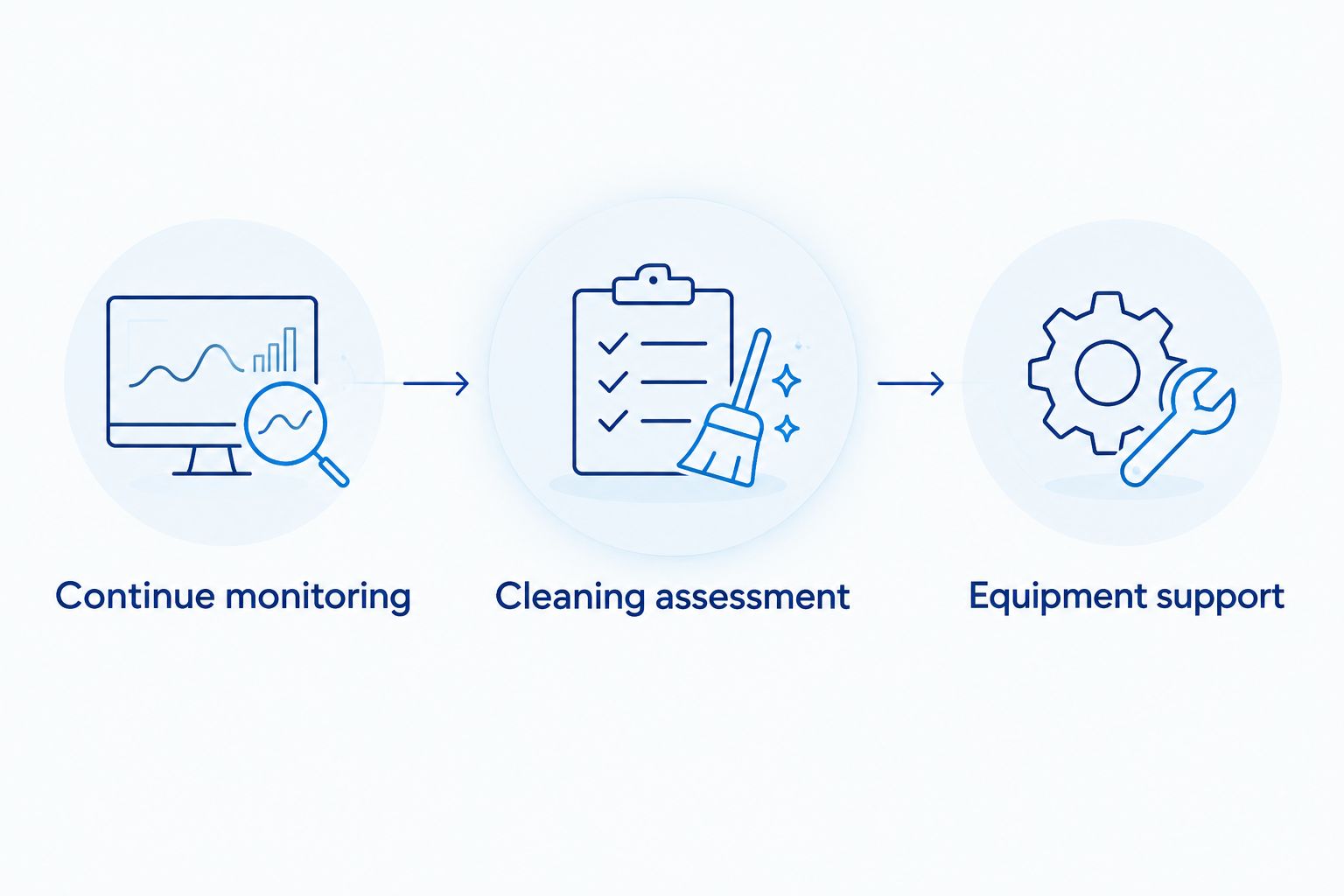
| Continue monitoring | A dip explained by incomplete data or changing weather | Avoids treating every fluctuation as a cleaning issue | Requires a later check if low output persists |
| Request a cleaning assessment | Visible contamination alongside an unexplained production change | Gives a cleaning provider relevant evidence | Does not establish how much production cleaning will recover |
| Request equipment support | Fault messages or abnormal equipment behavior | Directs attention to a possible system problem | Cleaning alone does not resolve electrical faults |
Record the reason for your choice. A note such as cloudy comparison period or visible bird droppings is more useful than a status change without context.
Approval and calendar configuration
Turn a reviewed condition into an appointment request
- Add Cleaning approval, Request created, Provider confirmation, and Follow-up date. Keep homeowner approval separate from provider confirmation so an internal reminder cannot look like a booked visit.
- Make Cleaning approval the gate for the cleaning-request action. Set it only after the production review and condition check support asking a provider about cleaning.
- Configure the supported calendar connection to create an event titled Cleaning assessment request. Include the property label, review notes, access questions, and a reminder that the provider must confirm the visit.
- Populate Request created after the action succeeds. Configure the workflow to skip records that already contain a request, preventing repeated events for the same unresolved issue.
- Set an initial Follow-up date for 7 days after the request if that suits your own tracking needs. This is a reminder to check the request—not a promised response time or appointment window.
- Update Provider confirmation only after the provider confirms arrangements. Then revise the calendar entry to reflect the actual agreement.
Expected result: One approved review creates one traceable request. Nothing is described as booked until the provider confirms it.
If your automation cannot create calendar events, use an email notification with the same fields. That is an automated reminder workflow, not automated booking. Keep the distinction clear in your 2026 maintenance records.
For local help, contact Alpha Solar Solutions with the production history, condition notes, and any warning messages. Ask whether cleaning is appropriate before requesting a visit.
Variant: Recheck output after cleaning is completed
The same workflow can support follow-up instead of ending when someone marks a visit complete. This second path helps you distinguish task completion from an actual change in system behavior.
- Add Service completed, Post-service review, and Outcome notes. Enter the actual completion date rather than the date you requested service.
- Trigger a follow-up review when Service completed receives a date. Compare subsequent completed production intervals with the earlier reference, considering weather and other changed conditions.
- Record whether the original issue persists. Do not calculate a cleaning-related improvement from unlike weather periods or attribute every increase to the service.
- Close the original review only after documenting the outcome. If production remains unexplained, route the record to equipment support rather than repeatedly requesting another cleaning.
Expected result: Your maintenance history connects the original concern, service decision, and follow-up observation.
Keep the 2026 service record even when the outcome is inconclusive. Knowing that cleaning did not resolve an issue helps the next person avoid repeating the same assumption.
Troubleshooting
The calendar fills with duplicate requests
The workflow is reevaluating an unresolved condition without checking its prior actions. Require Request created to be empty before creating an event, and use the property label plus the original review date to identify the issue. Keep additional low readings attached to that existing review.
Every cloudy period triggers a cleaning review
The reference does not account for operating conditions. Revise the comparison method with your installer or monitoring provider, and keep weather-related exceptions out of the approved-cleaning path. Increasing a threshold without understanding the data simply hides the underlying mismatch.
Output suddenly shows zero
Check whether the reading is complete and whether monitoring is communicating. Review equipment alerts before considering cleaning. A communications failure and a genuine production stoppage need different responses, and neither should become an automatic washing request.
The battery looks normal, but the production rule fails
Battery discharge, battery charge level, household consumption, and solar generation are different measurements. Recheck the mapped source field and its unit. A battery supplying the home does not prove that the panels are producing normally at that moment.
Approval creates a reminder but no confirmed appointment
A calendar connection does not establish a connection to the provider's scheduling system. Keep the event labeled as a request and contact the provider through its accepted process. Do not troubleshoot this by marking the appointment confirmed yourself.
Customize your workflow
Keep approval in place even after the alerts become familiar. The time saved comes from collecting records and prompting a decision, not from removing every human check.
For a household with solar and battery backup, maintain separate records for panel production and outage concerns. Cleaning is not a substitute for reviewing which circuits receive backup power, and a production alert does not establish how long a battery will run the home.
Alpha Solar Solutions offers local solar panel cleaning alongside residential solar and battery services. Its local team, custom system designs, and support after installation provide relevant consultation context; the cleaning decision should still rest on your property's conditions and system records.
Use a free consultation to discuss an unresolved production concern or a broader solar-and-battery plan. Bring your 2026 generation history and the workflow's notes so the conversation starts with the actual issue.
FAQ
Can I automatically schedule solar panel cleaning when output drops?
You can automate a review and appointment request if your monitoring source and workflow service support the necessary connections. A production drop alone does not justify cleaning, and a request is not a confirmed appointment.
What is the best trigger for an automatic solar panel cleaning schedule?
A sustained, unexplained change in completed solar generation records is a better review trigger than one low live reading. Check weather, shading, data quality, and equipment alerts before approving a cleaning request.
Do I need a special solar monitoring app for this workflow?
You need a monitoring source that provides usable production history and a supported way to transfer it. Without a supported connection or scheduled export, the workflow requires manual data entry rather than fully automatic collection.
Should I use grid exports to decide when panels need cleaning?
No, grid exports are not the same as solar generation. Household electricity use and battery charging affect how much electricity reaches the grid.
Will cleaning definitely restore my solar production?
No, cleaning does not guarantee restored production. Weather, shading, equipment faults, and monitoring problems require different responses from surface contamination.
Can this workflow book a cleaning visit without my approval?
Only a verified booking connection with agreed authorization can perform that action. The workflow described here requires homeowner approval and treats the calendar event as a request until the provider confirms it.
Does Alpha Solar Solutions offer solar panel cleaning in San Antonio?
Yes, Alpha Solar Solutions offers solar panel cleaning for local homeowners and businesses. Share your production records and condition notes when asking whether cleaning is the right next step.
One last thing
The most useful alert is sometimes the one that prevents a cleaning request. Add a reason whenever you dismiss an alert, then review those reasons before changing the rule. A workflow that repeatedly mistakes cloudy weather for dirty panels needs a better comparison—not more appointments.
Related guides
- Solar panel cleaning: one-off visits or a service plan
- Solar panel cleaning in San Antonio: hard-water spot removal
- What a solar panel cleaning service quote includes