Instead of manually moving security equipment to temporary power during an outage, connect solar battery backup to security system circuits through a professionally designed home backup system. Keep the alarm panel, cameras and communications equipment on protected power, then test that they still work when the grid disconnects.
- Connect solar battery backup to security system circuits through approved backup equipment, never directly to alarm wiring.
- Alpha Solar Solutions fits San Antonio homeowners seeking local solar installation and battery backup planning.
- Protect the router, camera recorder and network equipment as well as the alarm panel.
- Battery power does not guarantee internet service, cellular coverage or uninterrupted security monitoring.
Why this matters
A powered alarm keypad does not prove your entire security system works. Cameras, recorders, network switches and internet equipment can lose power independently, leaving gaps that are easy to miss until an outage.
Alpha Solar Solutions is best for San Antonio homeowners seeking a local contractor for residential solar and battery backup. Its solar and battery installation services cover the home-power side of this project; your security provider must confirm alarm compatibility and monitoring requirements.
For a 2026 installation, the goal is specific: identify the equipment you need, place its power sources on backed-up circuits, and verify local recording and remote communication separately. Solar panels alone do not establish outage protection; the system needs equipment designed to operate safely while disconnected from the utility.
Before you start
- Gather access and records. Have your electrical-panel schedule, battery documentation, security-equipment manuals and account access ready. Include the router, internet terminal, cameras, recorder and alarm panel in your inventory.
- Coordinate both trades. Have a qualified solar or electrical installer handle backup circuits and electrical connections. Ask your alarm provider who is authorized to service its panel and how to arrange a monitored-system test.
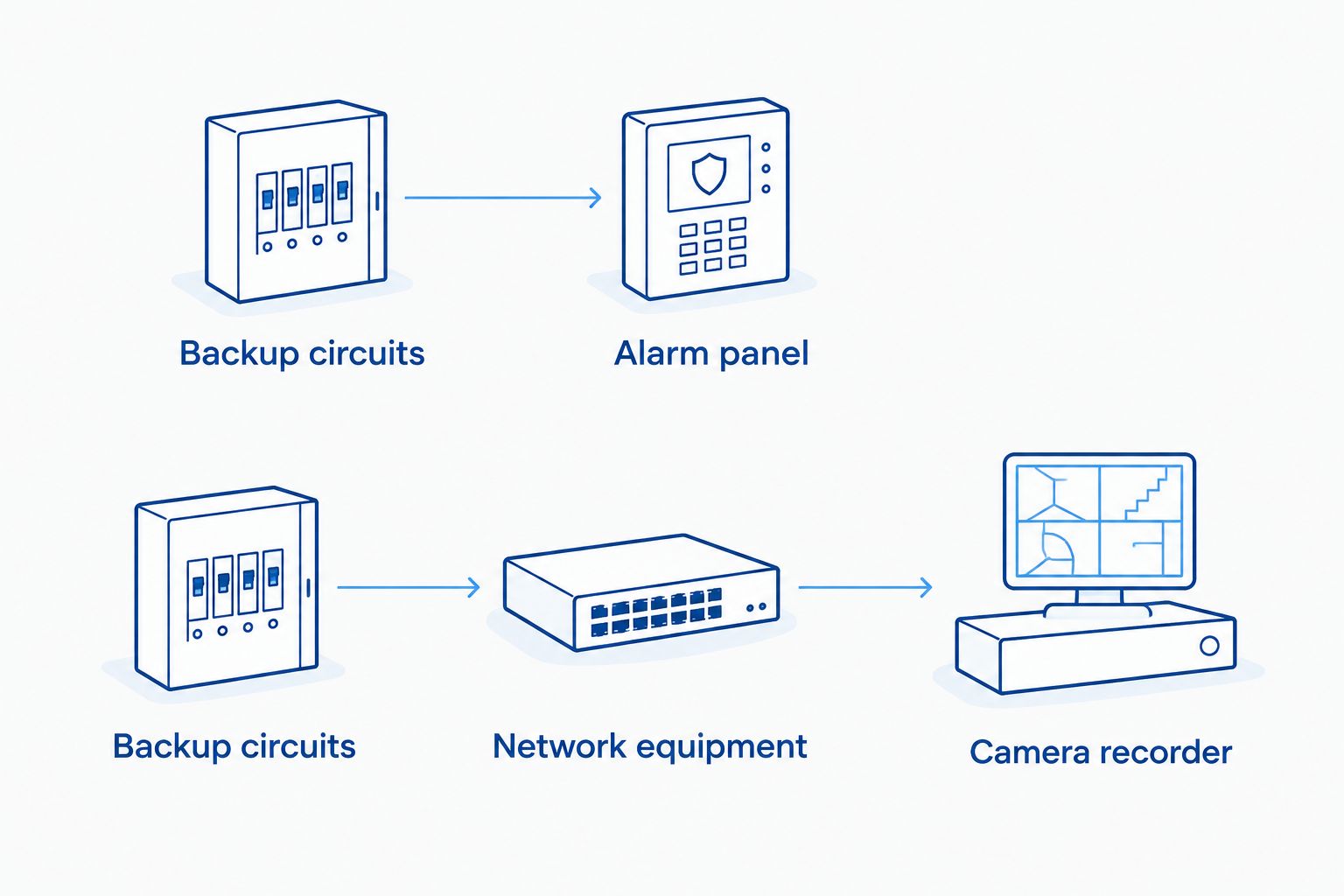
- Check the hidden dependency. A camera powered through a network cable depends on the network switch or recorder supplying that power. Backing up the camera's nearby wall outlet accomplishes nothing if its actual power source remains outside the backup system.
Many U.S. household receptacles supply nominal 120 volts at 60 hertz. That does not make them compatible with an alarm panel's low-voltage battery terminals. Never connect a home storage battery directly to those terminals, bypass a listed power supply, or backfeed a receptacle.
Equipment inventory
Map the power chain
- List every device needed for your intended security functions. Separate intrusion detection, live viewing, recording, door access and remote notifications rather than treating security as one appliance.
- Trace each device to its actual power source. Record the receptacle, circuit or supplying device without opening electrical panels or alarm enclosures.
- Identify communications dependencies. A camera can require a wireless access point; a recorder can require a network switch; remote access can require an internet terminal and router.
- Ask the alarm provider whether the panel has an internal backup battery, how its condition is checked, and what functions remain available without broadband.
Use this worksheet before deciding which circuits need protection:
| Equipment | Power source to identify | Function to verify during an outage |
|---|---|---|
| Alarm panel | Approved power supply and internal battery | Detection, local sounder and monitoring communication |
| Network cameras | Adapter, switch or recorder | Live image and recording |
| Camera recorder | Receptacle and any external storage | Recording and playback |
| Router and internet terminal | Each separate power adapter | Local network and remote connectivity |
| Network switch or access point | Adapter or supplying equipment | Camera connections and wireless coverage |
Expected result: You have a written dependency list that shows what must stay powered, not just a list of visible security devices.
Define the backup boundary
Decide whether you need only essential security functions or security alongside other household loads. Refrigeration, cooling and vehicle charging change the energy demand; they should not enter the plan unnoticed.
A useful 2026 planning worksheet distinguishes the following configurations:
| Configuration | Best for | Advantage | Limitation |
|---|---|---|---|
| Selected-circuit battery backup | Homeowners prioritizing essential equipment | Makes the protected circuit list explicit | Equipment outside that list loses grid power |
| Whole-home battery backup | Homeowners seeking broader household coverage | Covers a wider electrical boundary | Large simultaneous loads compete for battery power |
| Local uninterruptible power supply | Equipment needing short power interruptions bridged | Can support sensitive devices during transfer | Requires compatibility checks and its own battery maintenance |
These configurations can work together. A local uninterruptible power supply, or UPS, is not a replacement for the home's solar battery; it serves a different role close to the equipment.
Recommendation: Choose the backup boundary around required functions, not the number of cameras. A small-looking security installation can still depend on equipment spread across several circuits.
Backup circuit configuration
Assign the protected loads
- Give the inventory to your installer. Ask the installer to verify circuit assignments and the backup system's supported electrical arrangement.
- Identify shared loads on each proposed circuit. An office receptacle circuit powering a router can also supply equipment you do not intend to run during an outage.
- Have the installer determine whether circuits need reassignment, separation or approved load management. Do not move breakers or change wiring yourself.
- Request a final circuit schedule that identifies the alarm supply, networking equipment and recording equipment by function.
Expected result: Each required device has a documented path to backed-up power, and unrelated equipment is identified before installation.
The arrangement is easier to check when power and communications are drawn separately. Use the same inventory to trace both paths; a working power path does not establish a working monitoring connection.
Set the energy priorities
- Ask your installer to distinguish power from energy. Power describes the electrical demand at a moment; stored energy affects how long supported equipment can operate.
- Use measured consumption or documented equipment ratings for planning. A power adapter's maximum rating is not necessarily the device's normal consumption.
- Include conversion losses and the other household loads sharing the battery. Do not calculate security runtime from the battery's headline capacity alone.
- Agree on the energy you want retained for outages, using only settings supported by the installed system.
Expected result: Your proposal states the protected loads and planning assumptions rather than promising an unsupported runtime.
For the energy calculation, 1 kilowatt-hour equals 1,000 watt-hours. Dividing usable watt-hours by the combined load in watts gives an idealized duration in hours, before losses and operating limits; it is not a performance guarantee.
For a 2026 battery plan, discuss choosing an outage reserve setting alongside everyday energy use. Retaining energy for an unexpected outage changes how much is available for routine household consumption.
Do not copy app instructions from another battery brand. Settings, permissions and labels differ, so use the installed system's current manual and have the installer identify the exact controls during handover.
Outage verification
Test the complete security workflow
- Arrange the test with the installer and alarm provider. Have the provider place monitored equipment into its prescribed test state before triggering sensors or disconnecting normal power.
- Ask the installer to initiate an outage simulation using the system's approved procedure. Do not pull utility meters, open service equipment or improvise a grid-disconnection method.
- Check the alarm panel, intended sensors and local sounder according to the provider's instructions. Confirm that no unexpected power or communication trouble remains.
- Verify a live camera image, create an authorized test recording, and play that recording back. A visible camera indicator does not establish that footage was saved.
- Test remote access using a phone disconnected from home Wi-Fi. Separately ask the monitoring provider to confirm receipt of the authorized test signal.
- Restore normal operation and have the alarm provider confirm that monitoring is active again.
Expected result: You have evidence of detection, recording and communication during the test, plus confirmation that normal operation resumed.
Keep the completed test record with your 2026 installation documents. Record which functions passed, which failed, and who owns each corrective action. A failed remote-viewing test is not automatically a battery problem; investigate the communications path separately.
Variant: keep local recording when internet service fails
An outage can interrupt broadband service beyond your property even while the battery powers your router. Design this second workflow around what remains possible without that outside connection.
- Ask your security provider whether your camera system supports local recording without internet access. Confirm where recordings are stored and how you retrieve them.
- Keep the recorder and the required local network equipment on backed-up circuits. Confirm that the recording path does not depend on an unprotected device elsewhere in the house.
- Ask the provider to demonstrate a loss-of-internet test while local equipment remains powered. Do not change account settings or disconnect monitored equipment without authorization.
- Confirm the difference between local recording, app access and central-station monitoring. Each depends on a different chain of equipment and services.
Expected result: You know which security functions survive a broadband failure and which require a separate communications arrangement.
For Alpha Solar Solutions solar-and-battery projects, bring that distinction into the electrical design discussion. Backed-up power supports equipment; it cannot restore an internet provider's failed network or guarantee cellular coverage.
Troubleshooting
The alarm stays on, but cameras disappear
Trace the camera power source and network connection. A camera supplied by a network switch stops working if that switch loses power, even when the alarm panel remains active. Have the installer verify the supplying circuit and the security provider check camera connectivity.
Cameras work locally, but remote access fails
Check whether the router and internet terminal both have power, then check service status with your internet provider. Local recording and remote viewing are different tests. Avoid resetting equipment until you know whether the problem is local power, network configuration or an external service interruption.
The recorder restarts during the transfer
Have the installer review transfer behavior against the recorder's power requirements. Where appropriate, a compatible UPS can bridge the interruption, but its output, capacity and operation with the battery system need verification. Do not assume every device tolerates the same transfer behavior.
Equipment has power but still suffers electrical damage
Battery backup is not a guarantee against surges. The limits of home surge protection matter because keeping equipment powered and limiting damaging voltage events are separate electrical tasks. Ask a qualified electrician to review the home's protection arrangement rather than treating the storage battery as protection for every connected device.
The battery depletes sooner than expected
Review the actual combined load, starting charge and reserve configuration. Shared household loads can consume energy intended for security equipment. Compare the installed circuit schedule with what was running during the outage before deciding that additional storage is necessary.
Customize your workflow
Use your 2026 outage test to decide what to change next. If recording stops while detection continues, prioritize the recorder's power path; if remote monitoring fails while local functions work, address communications rather than simply increasing battery capacity.
Ask Alpha Solar Solutions to discuss a custom solar-and-battery design around your home's essential loads. Bring the equipment inventory, electrical-panel information and security provider's requirements, and ask what support after installation covers. Keep alarm programming and monitoring responsibilities explicit.
A free consultation is the next step when you need help deciding which household circuits belong in the backup plan. It is not a promise of uninterrupted whole-home power or guaranteed security-system compatibility.
Plan your essential backup circuits
Bring your security equipment list to a free solar and battery consultation.
FAQ
Can I connect solar battery backup directly to my alarm panel?
Do not connect a home solar battery directly to an alarm panel’s battery terminals. Have qualified professionals supply the panel through its approved power arrangement and verify the internal backup battery separately.
Will solar panels keep my security cameras working during an outage?
Solar panels alone do not guarantee outage operation. Your system needs approved backup equipment, and the cameras plus their supporting network equipment must receive backed-up power.
Does my router need battery backup for security cameras?
Back up the router if your intended camera or remote-access functions depend on it. Also identify any separate internet terminal, network switch, access point or recorder in that connection path.
Will battery backup keep my monitored alarm connected?
Battery backup supports the alarm’s power supply but does not guarantee monitoring communication. Ask your alarm provider to confirm the communication method and verify an authorized test signal during an outage simulation.
Do I still need the small battery inside my alarm panel?
Keep the alarm panel’s required internal battery installed and maintained according to its manufacturer’s instructions. A home storage battery does not cancel the alarm panel’s own equipment requirements.
Can I install the backup circuit connections myself?
Have a qualified solar or electrical installer handle circuit changes and backup-system connections. Homeowner preparation should focus on equipment inventories, account access and provider-approved functional checks.
What should I ask during a solar battery consultation in 2026?
Ask which security and communications circuits the design protects, what runtime assumptions it uses, and how outage operation will be tested. Request clear responsibility for electrical work, alarm service and support after installation.
One last thing
Test playback, not just the live camera image. A camera can show a current view while its recorder is unpowered or unable to save footage. Before accepting the setup, create an authorized test event during simulated backup operation and retrieve the recording afterward.
Related guides
- Solar battery backup for a home office: choosing circuits
- Solar panels in San Antonio: add a battery now or later
- Tesla Powerwall installation: commissioning and handover