

A critical load panel is a dedicated subpanel that sends battery power only to the circuits you choose to keep running during an outage, such as your fridge, well pump, and a few lights. It works with a transfer switch and a backup output on your inverter, and it stretches a modest battery’s runtime far longer than trying to power the whole house. It’s the right call for most homeowners who want dependable backup without buying a battery bank sized for everything.
TL;DR:
- Critical load panels are more cost-effective and better-suited for short outages, powering only essential circuits like medical devices, refrigerators, and pumps.
- Proper wiring involves a dedicated backup output, correct neutral and ground bonding, and adherence to NEC and NFPA safety standards, ideally signed off by a licensed electrician.
- Sizing an inverter and battery requires precise calculations of continuous load, startup surges, and daily energy use, typically resulting in a system around 6 to 8 kWh per day.
- Smart load panels offer dynamic control and load shedding capabilities, making them more flexible and suitable for households with evolving energy needs, such as adding EV chargers.
- Preparing a detailed circuit list and consulting a qualified installer ensures system compatibility, safety compliance, and realistic backup duration estimates.
Table of Contents
- What Is a Critical Load Panel, and How Does It Differ From Whole-Home Backup?
- How Is a Critical Load Panel Wired Into Your Home?
- Which Circuits Should You Put on a Critical Load Panel?
- How Do You Size an Inverter and Battery for a Critical Load Panel?
- Are Smart Load Panels a Better Alternative to Traditional Subpanels?
- What Code and Safety Requirements Apply to Critical Load Panel Installation?
- Should You Choose a Critical Load Panel, Whole-Home Backup, or a Generator?
- What Should You Prepare Before an Installer Visit?
- Why Flexible Load Control Is Becoming the Smarter Default
- Get a Site Review From Alpha Solar Solutions
- Sources
What Is a Critical Load Panel, and How Does It Differ From Whole-Home Backup?
A critical load panel is a small secondary panel, wired downstream of your main panel, that only carries the circuits you have flagged as essential. During an outage, your battery’s backup output or a transfer switch routes power to that subpanel instead of the whole house. That distinction matters because most U.S. homes use around 30 kWh a day, while a typical residential battery holds 10 to 20 kWh of usable capacity. Try to back up everything and you’ll drain that battery in a matter of hours.
A critical load panel changes the math by narrowing the load:
- It powers only preselected circuits, so a smaller battery lasts through a multi-day outage instead of one evening.
- It costs less to install than a whole-home transfer switch and larger battery bank.
- It’s simpler to size correctly, since you’re planning around a known, limited list of appliances.
Whole-home backup still has its place. If you’re not willing to pick and choose circuits, or you’re running a home office, medical equipment, and a full kitchen off backup power simultaneously, whole-home coverage with multiple batteries may fit better.
How Is a Critical Load Panel Wired Into Your Home?
The subpanel sits between your battery’s backup output and the specific breakers you’ve chosen to protect. During normal operation, those circuits pull power from the main panel like everything else. When the grid goes down, a transfer switch redirects them to run off the battery instead. Here’s the general sequence an installer follows:
- The critical load panel is fed from the inverter’s dedicated backup output terminal, not the main service feed.
- An automatic transfer switch detects the grid outage and switches the subpanel to battery power, typically within a fraction of a second, so sensitive electronics rarely notice.
- A manual transfer switch requires you to flip it yourself, which is cheaper but means someone has to be home and aware when the power drops.
- The neutral and ground bond in the subpanel has to tie back to a single bonding point in the system, per code, to avoid dangerous ground loops.
That last step trips up a surprising number of DIY attempts and even some rushed installations. A double neutral bond can create stray current paths that trip GFCI breakers randomly or, worse, create a shock hazard. This is exactly the kind of detail NEC 706, the section governing energy storage systems, and NFPA 855 for stationary storage installations were written to address. A licensed electrician familiar with your local jurisdiction’s amendments to these codes should sign off on the wiring before your first outage test.
Which Circuits Should You Put on a Critical Load Panel?
Start with what actually keeps your household safe and functional, not what’s convenient. A reasonable priority order looks like this:
- Medical equipment (CPAP machines, oxygen concentrators, refrigerated medications)
- Refrigerator and freezer
- Sump pump or well pump
- Furnace or AC control board (the blower and thermostat, not full heating/cooling capacity)
- A handful of lighting circuits and outlets
- Networking equipment, if remote work or communication during an outage matters to you
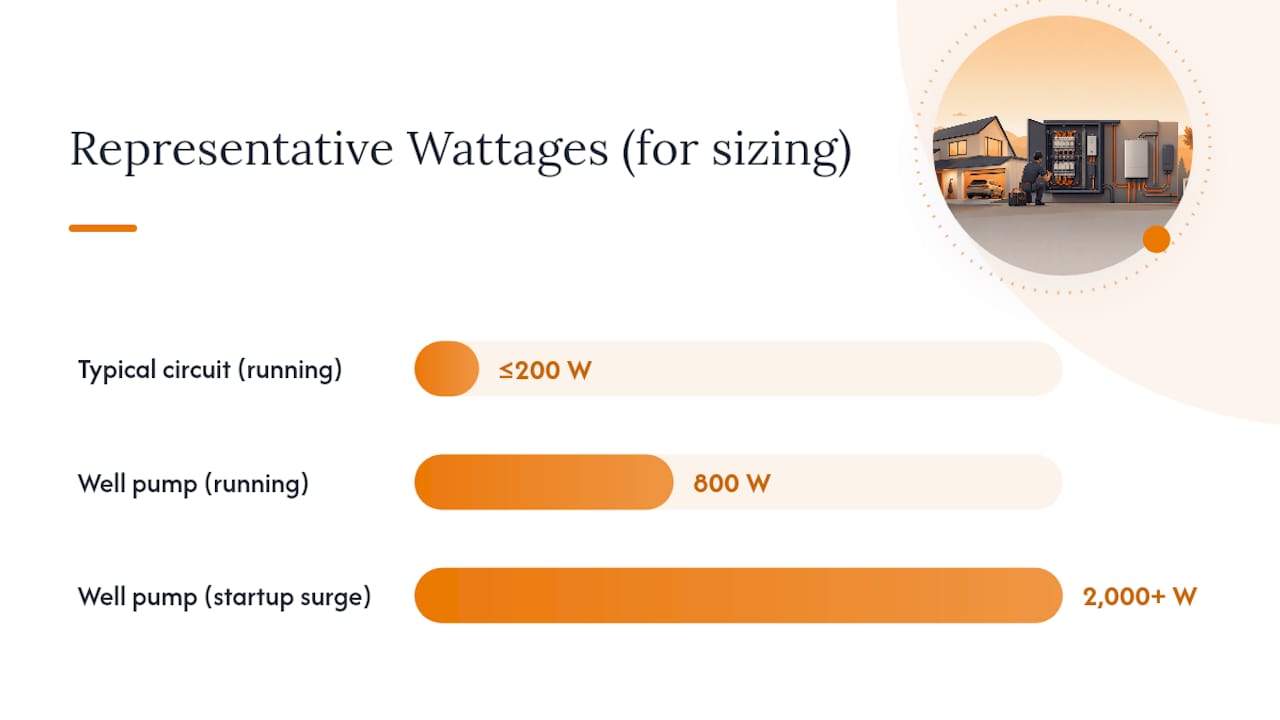
Running watts for most of these are modest, generally under 200 watts each except the fridge and pumps. The catch is startup surge. A well pump might run at 800 watts but demand 2,000 watts or more for a split second when the motor kicks on, and getting that startup math wrong is one of the most common sizing mistakes homeowners make, often leading to oversized inverters or unexpected breaker trips.
Pro Tip: Add up your running watts, then add the single largest startup surge on top, rather than adding up every appliance’s surge. Motors don’t all start at once.
Certain big draws almost always stay off a critical load panel: EV chargers, electric ranges, clothes dryers, and central air conditioning. They pull too much continuous power for a modest battery to sustain, and including them usually pushes you into needing a much larger, more expensive system.
How Do You Size an Inverter and Battery for a Critical Load Panel?
Sizing comes down to two numbers: how much continuous power your circuits need, and how much energy they’ll use over a full day.
- Add up the running watts of every circuit on your critical load panel to get your continuous load.
- Add the largest single startup surge among your motor-driven appliances (the well pump, not the fridge, is usually the biggest) to get your required peak capacity.
- Match that total against an inverter rated for it. Most critical-load setups land on a 4 to 6 kW inverter, which comfortably covers a fridge, well pump, and lighting with room for surge.
- Estimate daily energy use in watt-hours by multiplying each appliance’s running watts by hours of expected use per day, then sum them.
- Divide that daily watt-hour total by 0.8, since most batteries are only rated for 80% usable depth of discharge, to find the battery capacity you actually need to buy.
For context, a typical critical-loads configuration targets roughly 6 to 8 kWh per day of essential-circuit energy. If your math comes out lower than that, double-check you haven’t missed a device, because underestimating is far more common than overestimating. If you’re planning around hurricane season or multi-day outages, padding your battery estimate by 20 to 30% gives you a safety margin worth having.
Are Smart Load Panels a Better Alternative to Traditional Subpanels?
A traditional critical load panel is fixed once it’s installed. Whatever circuits you wired into it are what you’re stuck with unless an electrician comes back to move breakers around. Smart load panels and smart breakers solve that problem by adding real-time monitoring and remote control, so you can change which circuits get backup priority from an app instead of a wrench.
That flexibility isn’t just convenient. Smart panels can meaningfully increase usable backup duration compared with a fixed subpanel, because they can shed or reprioritize circuits on the fly as conditions change during an outage, rather than powering a rigid list regardless of actual need.
- Smart breakers let you flip individual circuits on or off remotely without touching the panel itself.
- Load-management devices, including products from Inhab, Eaton, and Siemens, automatically shed or sequence large loads like EV chargers and pool pumps to prevent overloads.
- These systems can help you add an EV charger or heat pump without triggering a costly utility service upgrade, which otherwise runs well into the thousands of dollars.
A basic critical load panel is usually the cheaper, simpler install if your circuit list is short and stable. Smart panels and load management earn their higher price tag once you’re juggling an EV charger, a pool pump, or a household that keeps adding electric appliances.
What Code and Safety Requirements Apply to Critical Load Panel Installation?
Your installer needs to work within NEC and NFPA frameworks, and your local Authority Having Jurisdiction (AHJ) may layer on its own amendments. NEC 706 governs energy storage systems generally, NEC 701 covers legally required standby systems in some contexts, and NFPA 855 sets safety standards for stationary storage installations. None of this is optional paperwork. It’s what keeps first responders safe and your insurance valid.
Before signing off on a job, confirm:
- The subpanel is labeled correctly so firefighters or utility crews know it’s a backup source, not standard service.
- Required disconnects are installed and accessible, not buried behind storage boxes in a corner.
- Service-entrance ampacity can actually support the added backup equipment.
- Panel bus rating and breaker compatibility have been checked, not assumed.
- Your local AHJ has approved the permit and inspected the finished work.
The most common installation problem isn’t bad wiring. It’s skipping the permit and inspection step to save time, which can leave you with an uninsurable system if something goes wrong later.
Should You Choose a Critical Load Panel, Whole-Home Backup, or a Generator?
A critical load panel makes the most sense when your budget is modest and you’re comfortable prioritizing a specific list of circuits. It delivers the most useful runtime per dollar of battery capacity for the majority of households.
- Choose whole-home backup if you’re unwilling to prioritize circuits, or if your household runs enough simultaneous high-draw equipment that multiple batteries make more sense than picking favorites.
- Choose a generator or hybrid battery-generator setup if you’re dealing with heavy HVAC loads or outages that regularly stretch beyond a few days, since batteries alone struggle to sustain air conditioning through extended heat.
- Choose a critical load panel paired with load-management gear if you want room to add an EV charger or heat pump later without redoing the whole system.
There’s no universally correct answer here. It depends on how much you’re willing to spend upfront versus how much flexibility you want later.
What Should You Prepare Before an Installer Visit?
Walk into your consultation with a written list of the circuits you consider essential, photos of your main panel’s interior, and the make and model numbers for any medical equipment you’re planning to back up. If you’re running an EV charger or another large appliance, note it, since that changes the sizing conversation entirely.
Your installer will inspect available panel spaces, check your service rating, confirm breaker compatibility, and verify the inverter’s backup output terminals match your equipment. Get the exact kWh and kW specs for medical devices in writing ahead of time, since guessing here is the fastest way to undersize a system.
- Bring a list of appliances you consider non-negotiable.
- Note any planned additions, like an EV charger, in the next two to three years.
- Ask about realistic timelines, since most critical-load installations run one to three days once permits clear.
Pro Tip: If an installer skips asking about your service panel’s age or bus rating, that’s a red flag worth pushing back on.
Why Flexible Load Control Is Becoming the Smarter Default
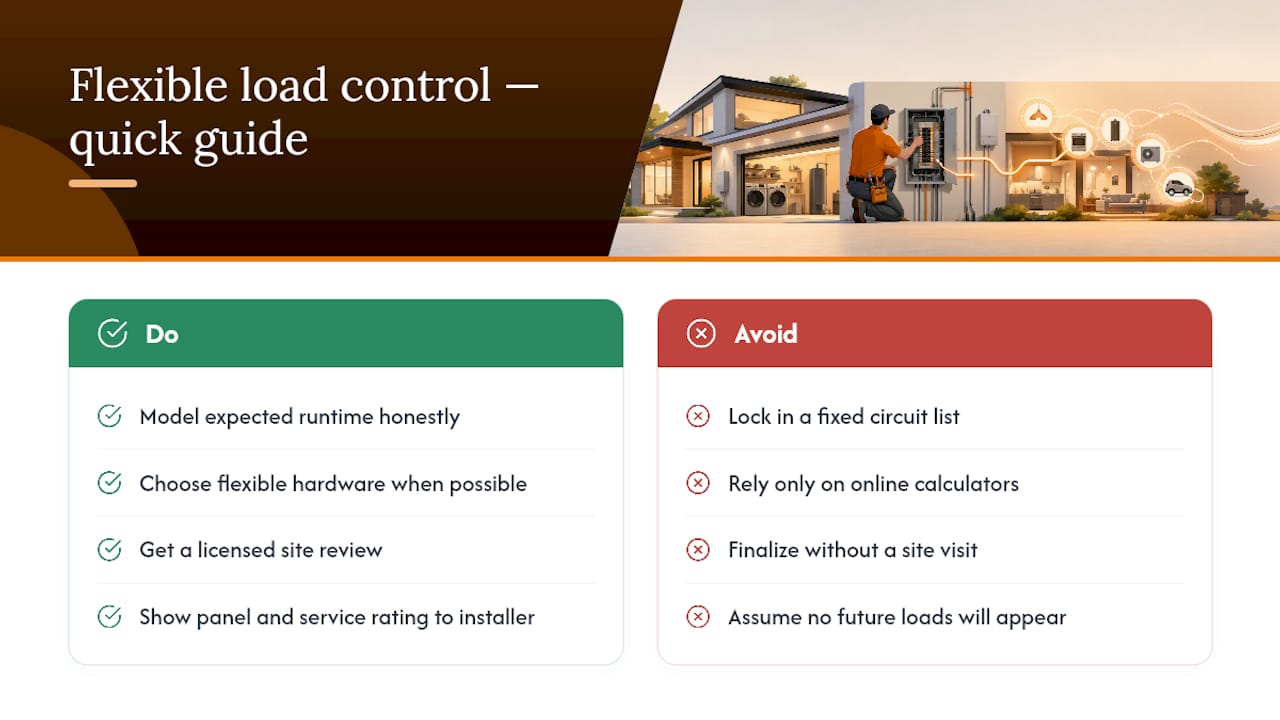
Homeowners who lock in a fixed circuit list often regret it within a year or two, usually because they add an EV charger, a home office, or a new appliance that doesn’t fit the original plan. Flexible systems, whether smart breakers or load-management devices, absorb that kind of change without a rewiring job.
My advice: model your expected runtime honestly before finalizing which circuits go on the panel, and lean toward flexible hardware whenever your budget allows it. A site review with a licensed installer will tell you more in an hour than any online calculator, especially once your actual panel and service rating are in front of someone qualified to read them.
— Anthony
Get a Site Review From Alpha Solar Solutions
Sizing a critical load panel on your own is a good starting point, but the real answer to “will this actually work during a three-day outage” comes from someone standing in front of your electrical panel. We handle residential battery and panel installations, transfer-switch wiring, and EV charger coordination for homeowners, and build every quote around your specific circuit list instead of a generic package.

A consultation includes a full panel review, a modeled backup duration based on your actual appliances and battery choice, and a written scope with pricing before any work begins. If you’re also weighing an EV charger against your backup plans, we can walk through load coordination options at the same visit. Start with a residential consultation and get a real answer instead of a guess.
Sources
For deeper technical detail, EnergySage’s overview of critical load panels covers battery capacity tradeoffs, while BatteryStorageHQ’s sizing guide walks through inverter and code specifics. Siemens’ Inhab Load Manager page explains load-shedding hardware, and homeowners weighing broader home electrification upgrades may also find South Miami Tint’s guide to solar control window tinting useful for reducing overall home energy load.
- Critical Load Panels: What Should You Know? | EnergySage
- Critical-Loads Panel Setup for Battery Backup | BatteryStorageHQ
- Inhab Load Manager | Siemens
- What Is Critical Load Panel? Definition & Guide | SurgePV