
TL;DR:
- Monitoring in solar tracks energy production, consumption, and system health using sensors and software. Different tools suit various setups, from manufacturer apps to third-party monitors, with early fault detection protecting your investment. Regular data review helps optimize system performance and save money.
System monitoring in solar is the process of tracking your solar panel system’s energy production, consumption, battery status, and grid interaction using hardware sensors and software tools to keep your system running at peak performance. The industry term for this practice is solar performance monitoring, and it covers everything from real-time output data to fault alerts. Tools like the Enphase App, Solar Station, and Emporia Vue give you a clear picture of exactly what your system is doing at any given moment. Without this visibility, small problems quietly drain your savings before you ever notice them.
How does system monitoring in solar actually work?
Solar performance monitoring combines physical hardware with software to collect and display data from your system. The hardware side includes current transformer clamps (CT clamps), inverters, and consumption meters. The software side includes mobile apps, cloud platforms, and dedicated display units.
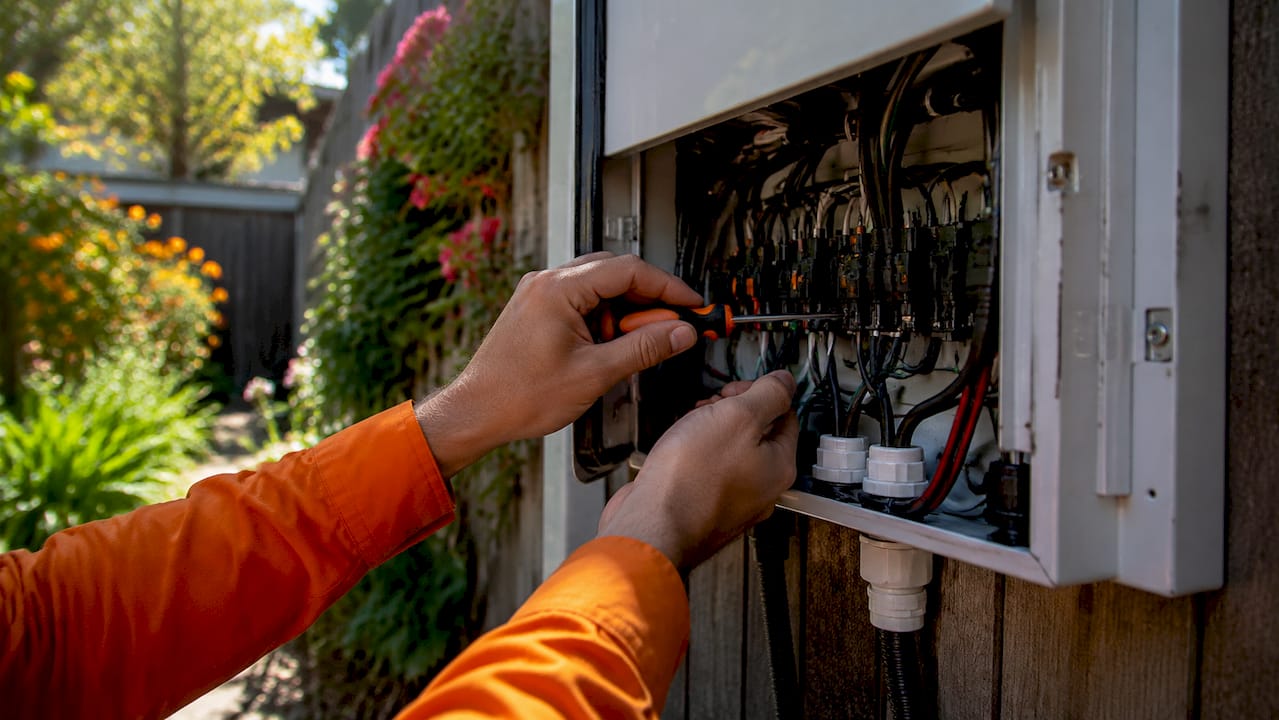
CT clamps wrap around your electrical wires and measure the flow of electricity. Placement matters enormously here. Sensors must be installed on the AC output lines after the inverter, not on the DC wiring between your panels and the inverter. DC lines carry a different type of current that most sensors cannot read accurately. Getting this wrong means your data will be wrong from day one.
The metrics your monitoring system tracks typically include:
- Solar production: How many kilowatt hours (kWh) your panels are generating
- Home consumption: How much electricity your home is using in real time
- Battery status: Current charge level and whether the battery is charging or discharging
- Grid interaction: Whether you are drawing from or sending power back to the grid
- System health: Color-coded alerts (green, yellow, red) showing normal or fault conditions
Pro Tip: When your installer sets up CT clamps, confirm in writing that sensors are placed on AC lines after the inverter. Many homeowners only discover the error months later when their data looks suspiciously flat.
For circuits where energy flows in two directions, such as solar export lines or EV charger circuits, bi-directional sensor setup is required. Skipping this step causes inverted or inaccurate readings that make your data unreliable.
What monitoring solutions are available for homeowners in 2026?
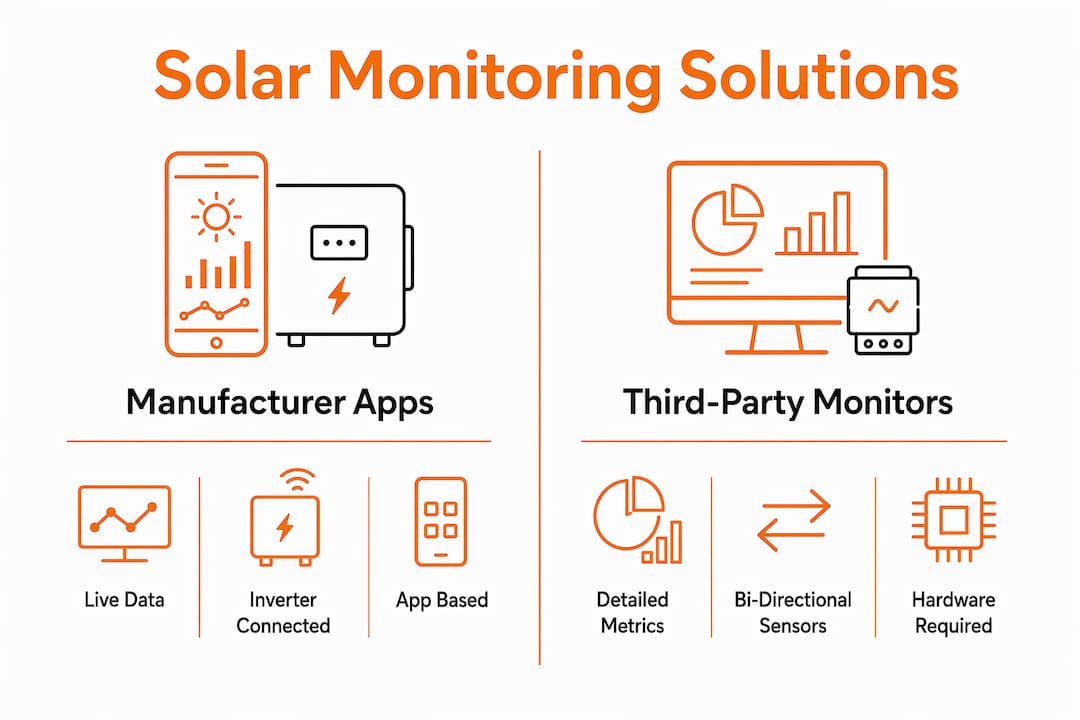
Three main categories of solar energy monitoring tools exist for homeowners: manufacturer apps, physical dedicated displays, and third-party energy monitors. Each has a different strength.
Manufacturer apps
Apps from companies like Enphase and SolarEdge connect directly to your inverter and give you live energy flow visualization with fault alerts on your smartphone. The Enphase App provides 24/7 automatic monitoring and notifies you immediately if production drops or an inverter fault occurs. This is the most common starting point for new solar owners because it comes bundled with the system.
The limitation is real, though. SolarEdge’s app has documented issues with multiple inverter setups and manual battery controls. Users report tracking inaccuracies that make it difficult to trust the data when systems grow more complex. If you plan to expand your system, evaluate the app’s capabilities before you commit.
Physical dedicated displays
Devices like the Solar Station 10" show production, consumption, battery level, grid pricing, and weather on a screen that refreshes every 5 minutes. No phone required. You glance at it like a clock. For homeowners who do not want to open an app every time they check their system, this format is far more practical for daily use.
The catch is that physical displays still pull data from cloud servers. If your internet goes down or the cloud service has an outage, the screen goes stale. That is a commonly overlooked weakness worth knowing before you buy.
Third-party energy monitors
Devices like Emporia Vue add a layer of detail that manufacturer apps often miss. Emporia Vue uses bi-directional 50A sensors to track energy flows across solar export, battery, and EV circuits with high accuracy. This is the right tool if you want granular data on exactly where your energy is going and coming from.
Here is a quick comparison of the three options:
| Feature | Manufacturer App | Physical Display | Third-Party Monitor |
|---|---|---|---|
| Update frequency | Real-time to 15 min | Every 5 minutes | Real-time |
| Phone required | Yes | No | Yes or display |
| Bi-directional tracking | Limited | Limited | Yes (Emporia Vue) |
| Multi-inverter support | Limited | Depends on brand | Yes |
| Internet dependency | Yes | Yes | Yes |
| Ease of setup | Easy | Moderate | Moderate |
Some homeowners need secondary hardware to monitor consumption alongside production. Without it, you only see half the picture.
How do you read your solar monitoring data and act on it?
The most useful skill you can build as a solar owner is knowing what normal looks like for your system. Once you know your baseline, anything unusual stands out immediately.
Here is what to watch for and what it means:
- Green status, steady production: Your system is healthy. Production should follow a predictable curve that peaks around midday and tapers off in the morning and evening.
- Yellow or red alerts: These signal a fault or low production warning. The Enphase App, for example, sends color-coded fault alerts directly to your phone so you can act quickly.
- Sudden production dip on a clear day: This often points to dirty panels, shading from a new obstruction, or an inverter issue. A quick check of your panel cleaning schedule can rule out the simplest cause first.
- Consumption spike at unusual hours: This can reveal a malfunctioning appliance or a circuit drawing power when it should not be.
Pro Tip: Set a weekly 5-minute check routine. Pull up your app every Monday morning and compare last week’s production to the week before. Seasonal changes are normal, but a sudden drop of 15% or more on similar weather days warrants a call to your installer.
Early fault detection through active monitoring protects your return on investment directly. A dirty panel or minor inverter fault left unaddressed for months can quietly cost you hundreds of dollars in lost production. Catching it in week one costs you nothing but a phone call.
Use your consumption data to shift high-energy tasks, like running the dishwasher or charging an EV, to peak solar production hours. This reduces how much grid power you pull and stretches your savings further. Alphasolarsa covers this approach in detail in our guide on optimizing solar energy for maximum home savings.
What are the real benefits and challenges of solar system monitoring?
Solar system efficiency measurement gives you control over an asset that otherwise runs silently in the background. The benefits are concrete and financial.
Benefits of active monitoring:
- You catch faults before they become expensive repairs
- You see exactly when your system pays for itself each day
- You can adjust energy habits based on real production data
- Battery management improves when you know charge levels in real time
- Peace of mind replaces guesswork
Challenges to plan for:
- App compatibility issues arise with older inverters or multi-brand setups
- All cloud-based tools require a stable internet connection to function
- Third-party hardware like Emporia Vue adds upfront cost
- New users sometimes find the data volume overwhelming at first
The right monitoring setup depends on your system size, your comfort with technology, and how hands-on you want to be. A single-inverter home system with a standard battery is well served by a manufacturer app. A larger setup with multiple circuits and an EV charger benefits from a third-party monitor with bi-directional sensors. Matching the tool to the system is the decision that matters most.
For Texas homeowners, our solar savings workflow walks through how monitoring fits into a broader energy management plan specific to local conditions.
Key Takeaways
Effective solar performance monitoring requires the right hardware placement, the right software tool for your system size, and a consistent habit of reviewing your data to catch problems early.
| Point | Details |
|---|---|
| Sensor placement is critical | CT clamps must go on AC lines after the inverter, not on DC wiring, for accurate readings. |
| Match the tool to your setup | Manufacturer apps work for simple systems; third-party monitors like Emporia Vue suit complex setups. |
| Physical displays suit daily use | Devices like Solar Station show data without a phone, but still require internet to update. |
| Early fault detection saves money | Catching a dirty panel or inverter fault quickly prevents months of lost production and income. |
| Consumption data drives savings | Shifting high-energy tasks to peak solar hours reduces grid dependency and lowers your bill. |
What I have learned from watching homeowners monitor their systems
I have seen two types of solar owners. The first installs their system, gets the app, and never opens it again. The second checks their data regularly and treats their system like a small business. The second group consistently gets more value from the same hardware.
The most common mistake I see is trusting the green light without understanding what it means. A system can show green status while producing 20% less than it should because of gradual panel soiling. The Enphase App will not always flag that as a fault. It just looks like a slightly slower day. Only someone who knows their baseline catches it.
My honest recommendation: start with your manufacturer app, learn your system’s normal production curve over the first 90 days, and then decide if you need more detail. Most homeowners with a straightforward setup do not need a third-party monitor right away. But if you add a battery, an EV charger, or a second inverter, upgrade your monitoring at the same time. The data complexity grows faster than most people expect.
Physical displays are underrated. I have seen homeowners glance at a Solar Station on their kitchen counter and catch a production drop before their app ever sent a notification. Sometimes the simplest tool is the most reliable one.
The goal of monitoring is not to become a data analyst. It is to protect your investment and make sure your system delivers what you paid for, every single day.
— Anthony
See how Alphasolarsa sets up monitoring from day one
At Alphasolarsa, every residential solar installation includes guidance on monitoring setup so you know exactly how to read your system from the first day it goes live. We help San Antonio homeowners choose the right monitoring approach for their system size, whether that is a manufacturer app, a dedicated display, or a third-party energy monitor. Our team also handles post-installation support when something looks off in your data. If you are ready to own your energy and track every kilowatt hour your panels produce, explore our residential solar installation services and get a custom quote built around your home.
FAQ
What is system monitoring in solar energy?
System monitoring in solar energy is the practice of tracking your solar panels’ production, home consumption, battery status, and grid interaction using sensors and software tools. It gives homeowners real-time visibility into their system’s performance and health.
How often does solar monitoring data update?
Update frequency depends on the tool. Manufacturer apps like the Enphase App provide near real-time data, while physical displays like Solar Station refresh every 5 minutes by pulling data from cloud servers.
Do I need the internet for solar monitoring to work?
Yes. All current cloud-based monitoring tools, including physical displays and manufacturer apps, require a stable internet connection to show current data. If your connection drops, the display or app will show outdated information.
Why are my solar monitoring readings inaccurate?
Inaccurate readings are most often caused by incorrect sensor placement on DC lines instead of AC lines, or by missing the bi-directional setting on circuits where energy flows in both directions.
How does monitoring help protect my solar investment?
Active monitoring catches faults like dirty panels or inverter issues early, before they cause months of reduced production. Addressing small problems quickly keeps your system performing at the level you paid for.