
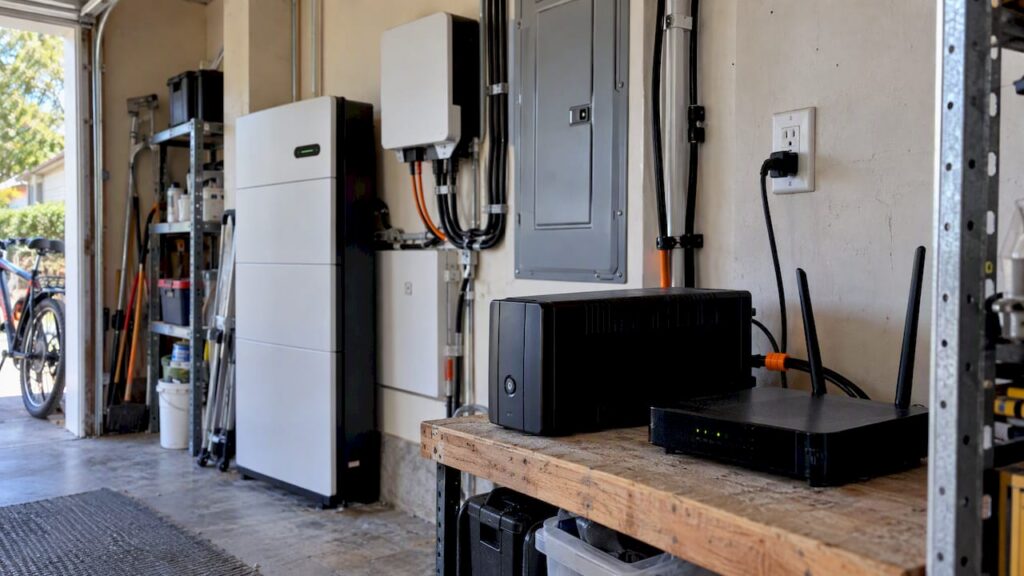
Keep your smart home running by pairing short-term UPS protection for your router, hub, and controllers with a properly sized battery system and smart-panel load coordination. UPS units handle brief interruptions and protect sensitive electronics, while a battery with an inverter and transfer switch carries you through longer outages. For real reliability, both should report into your smart-home controller so you get alerts and automatic load shedding, and a certified installer should handle code compliance and transfer-switch setup.
TL;DR:
- A UPS protects routers, hubs, and storage for seconds to a couple of hours; Home Assistant can monitor it through a NUT server.
- Size batteries from measured wattage and desired runtime, add a 20% to 25% surge margin, and shed nonessential circuits before buying more storage.
- Fixed systems tied to the electrical panel typically need permits and inspection; a licensed installer must configure transfer switches and prevent unsafe grid backfeed.
- Test UPS switchover monthly, verify actual battery runtime with an annual full discharge, and retest transfer timing and load shedding after firmware updates.
Table of Contents
- UPS vs. whole-home battery vs. hybrid approaches
- How integration works: panels, HEMS, and Home Assistant
- Sizing your backup: capacity, power, and runtime
- Installation, safety, and code compliance
- A setup checklist and sample configurations
- Monitoring, testing, and maintenance
- What installers wish homeowners knew before backup day
- Let us integrate your backup power system
- FAQ
- Sources
UPS vs. whole-home battery vs. hybrid approaches
Homeowners usually choose between three categories of backup power, and each solves a different problem. A UPS (uninterruptible power supply) is a local unit, often the size of a shoebox, that holds a small battery and switches to it instantly when the grid drops. It protects whatever is plugged into it for seconds to a couple of hours, long enough to prevent a corrupted smart-home database or a router that needs a hard reboot every time the power blinks.
A whole-home battery system is a different animal entirely. It pairs a larger battery bank with an inverter and a transfer switch, and it can power part or all of your house for hours or even days depending on capacity and load. These systems integrate with your home’s electrical panel rather than plugging into a single outlet, so they can carry refrigeration, lighting, and in some cases HVAC.

Between those two extremes sit portable, plug-and-play battery stations. They are not wired into your panel, which makes them a reasonable option for renters or anyone who wants temporary resilience without an electrical installation.
Here is how to think about which layer you need:
- UPS only makes sense for protecting routers, smart-home hubs, network-attached storage, and security cameras where a clean, instant handoff matters more than runtime.
- Battery plus inverter is the right call for life-safety loads, lighting circuits, refrigeration, and partial HVAC support during outages that last longer than a UPS can bridge.
- Combining both gives you the best of each: the UPS keeps your network and automation brain alive without interruption, while the battery carries the heavier, longer-duration loads once the outage stretches past a few minutes.
- Portable battery stations cover short-term needs for renters or homes without a battery installation, though they will not integrate with your panel the way a fixed system does.
Most smart-home outages are brief, but the ones that are not tend to matter most, which is exactly why pairing a fast-switching UPS with a slower, larger battery system covers both ends of the problem.
How integration works: panels, HEMS, and Home Assistant
A resilient smart home needs its backup hardware to talk to its automation brain, not just sit next to it. The typical architecture runs from the battery and inverter, through a transfer switch, into a smart electrical panel, up to a home energy management system (HEMS), and finally into a smart-home controller like Home Assistant, with UPS devices feeding status in through middleware such as Network UPS Tools (NUT).
Smart panels and HEMS platforms matter because they give you circuit-level control instead of all-or-nothing power. NREL’s smart-panel HEMS field research found that coordinating circuits, batteries, and rooftop solar through a smart panel improves both resilience and energy savings compared to simply adding more storage. In practice, that means your panel can keep refrigeration and lighting energized while automatically shedding a pool pump or electric dryer circuit during an outage.
UPS devices add a second layer of intelligence. Most consumer and prosumer UPS units do not expose a standard API, so a bridge is usually required. The Home Assistant NUT integration connects to a NUT server and lets Home Assistant monitor whether a UPS has switched to “on battery,” track remaining charge, and trigger automations such as notifying you or initiating a graceful shutdown of a server or NAS before the UPS battery runs out.
A few patterns show up repeatedly in how these systems communicate:
- Local gateway control keeps automation logic on your own network, which tends to be faster and still works if your internet connection drops.
- Cloud-to-cloud integration relies on the manufacturer’s servers, which can add latency and stops working if your internet is down, even if power is fine.
- Embedded panel software runs decisions directly on the smart panel hardware, which is often the most resilient option since it does not depend on an external controller at all.
Pro Tip: Favor local-first automation (a local Home Assistant instance with a NUT server on your own network) for backup-power logic, since cloud dependency is the one thing an outage is most likely to break.
Sizing your backup: capacity, power, and runtime
Two numbers determine whether your backup system will actually get you through an outage: capacity, measured in kilowatt-hours (kWh), and power, measured in kilowatts (kW). Capacity is how much energy your battery holds in total. Power is how fast your devices draw from it at any given moment. Runtime is simply your usable capacity divided by your actual load, which is why a battery rated for a lot of kWh can still run out fast if you’re pulling too many kW at once.
Here’s a practical way to size a system for your own home:
- List the devices you want to keep running, including your router, Wi-Fi mesh points, smart-home hub, security cameras, smart locks, a handful of lights, and your refrigerator.
- Estimate or measure the wattage of each device, using a label, manual, or a plug-in power meter for accuracy rather than guessing.
- Add up total wattage, then add a safety margin of roughly 20 to 25% to cover startup surges, especially for anything with a compressor or motor.
- Multiply your adjusted wattage by the hours you want covered to get your required watt-hours, then convert to kWh by dividing by 1,000.
- Compare that figure to your battery’s usable capacity, keeping in mind that most batteries are not meant to be drained to zero.
Circuit-level load shedding is what makes this math forgiving. Rather than sizing a battery for every possible load running simultaneously, a smart panel can automatically drop non-essential circuits like a pool pump, electric dryer, or secondary HVAC zone, stretching your runtime considerably. NREL’s field work specifically points to circuit-level shedding, isolating high-draw circuits like HVAC while prioritizing essential electronics and refrigeration, as one of the most cost-effective ways to extend a battery’s practical runtime without buying more storage.
As a rule of thumb, a typical smart-home electronics load (router, hub, a few cameras, smart locks, and some lighting) draws relatively little continuous power, often well under 500 watts combined, which is a fraction of what a mid-sized battery can sustain for many hours. Life-safety circuits like sump pumps or medical equipment deserve their own dedicated, prioritized circuit rather than sharing capacity with general household loads.
Installation, safety, and code compliance
Battery backup systems are not a weekend DIY project once you move past a simple UPS, and the standards governing them reflect that. NFPA 855 sets the minimum safety requirements for stationary energy storage systems, covering design, installation, and fire-safety controls that apply directly to home battery installations. For systems intended to provide standby power during utility outages, NFPA 110 covers requirements for emergency and standby power systems meant to protect occupants and ensure the system is ready when the grid fails.
Before any fixed battery system goes live, expect several steps involving your local authority having jurisdiction (AHJ):
- Electrical permits are typically required for any system tied into your home’s panel, including battery storage and transfer switches.
- Interconnection agreements with your utility may be needed if the system can export power back to the grid.
- Inspection confirms the installation meets code before the system is energized.
- UL-listed equipment, including systems certified to UL 9540 or an equivalent standard, is generally expected for insurance and code purposes.
A home battery and transfer switch installation that isn’t configured correctly for islanding can backfeed the grid or fail to isolate your home during a repair, which is why NFPA 855 exists as a dedicated safety standard for these systems rather than leaving the work to general electrical code alone.
This is where the line between DIY and professional installation becomes clear. A UPS for your router or NAS is plug-and-play and entirely reasonable to handle yourself. A fixed energy storage system, a grid-interactive inverter, or anything involving a transfer switch and panel-level islanding is a job for a licensed, certified installer who understands both the electrical code and the fire-safety requirements involved.
A setup checklist and sample configurations
Walking into a conversation with an installer prepared saves time and gets you a system that actually matches your goals. Start with an inventory and work outward from there.
- List every device you want protected, separating “must stay on instantly” items (network gear, medical devices) from “can tolerate a short gap” items (general lighting, entertainment systems).
- Choose a UPS sized for your controllers and networking equipment, placed near your router and hub rather than in a separate utility closet.
- Decide which circuits should be battery-backed through the transfer switch, typically refrigeration, select lighting, and any life-safety equipment.
- Specify your monitoring and notification setup, whether that’s Home Assistant with a NUT integration or a vendor’s own app, so you know the moment the system switches to battery.
- Confirm permitting and inspection timelines with your installer before committing to an installation date.
Three configurations cover most homeowner goals. A minimal setup pairs a UPS with your router and hub for short-term network continuity only. A balanced setup adds a partial-circuit battery system for refrigeration and key lighting on top of UPS-protected electronics. A comprehensive setup combines a smart panel, whole-home battery, and an EV charger installed with vehicle-to-home (V2H) readiness in mind for future flexibility.
A few placement details matter more than people expect. Keep UPS units ventilated and away from direct sunlight or heat sources, and locate battery cabinets per manufacturer and code requirements, which usually means adequate clearance, ventilation, and some distance from frequently occupied living spaces.
Pro Tip: Ask your installer to run an islanding test and a transfer-timing test during commissioning, not just a basic power-on check, so you know exactly how your system behaves the moment the grid actually drops.
Monitoring, testing, and maintenance
A backup system is only as good as its last successful test. Setting up status alerts is the first step: Home Assistant’s NUT integration can notify you the moment a UPS switches to “on battery” or reports a low charge state, giving you time to react before anything shuts down unexpectedly.
Testing cadence matters more than most homeowners assume. A monthly quick check confirms your system still switches over correctly, while an annual full discharge test verifies real-world runtime rather than a manufacturer’s spec sheet number. Firmware updates for both UPS units and battery inverters should be applied promptly, since manufacturers frequently patch issues related to transfer timing and communication protocols.
Keep a simple log of test dates, results, battery cycle counts, and any firmware or configuration changes. This record becomes useful if you ever need warranty support or want to troubleshoot a gradual decline in runtime.
- Monthly: a quick functional test of UPS switchover and notification delivery.
- Annually: a full discharge test to verify actual runtime against expectations.
- After any firmware update: a retest of transfer timing and load-shed logic.
- Ongoing: a log of cycle counts and configuration changes for warranty and troubleshooting purposes.
DOE’s connected residential communities research found that testing islanding behavior and transfer-switch timing under simulated outage conditions prevents inrush-current faults and unintended tripping when a battery system energizes circuits, a finding that applies directly to routine home testing. If your system participates in a virtual power plant (VPP) program, remote monitoring and dispatch commitments can affect both availability during an outage and warranty terms, so it’s worth confirming those details with your installer upfront.
What installers wish homeowners knew before backup day
After years of wiring battery systems into homes across San Antonio, a few patterns repeat themselves. The most common mistake is undersizing: homeowners plan for a handful of devices, then add cameras, a second hub, and a mini-fridge without rechecking the math. The second is ignoring transfer-switch timing, assuming any switch is fast enough to protect sensitive electronics when some take longer than others. The third is skipping panel-level load shedding entirely and trying to size a battery for peak simultaneous demand instead.
When you talk to an installer, ask direct questions: What’s the actual transfer time? How is load shedding configured, and can I adjust priorities later? What testing happens at commissioning? A good installer welcomes those questions because the answers are what separate a backup system that works on paper from one that works at 2 AM during a real outage.
— Anthony
Let us integrate your backup power system
We design and install layered backup systems including custom battery systems sized to your actual loads, smart-panel integration for circuit-level prioritization, transfer-switch installation, and we handle permitting and commissioning. When you reach out, we start with a site survey and load study so the system we design matches what you want protected, then we manage the permitting and inspection process.
If you’re also exploring an EV charger as part of a longer-term resilience plan, we handle that installation too, including setups designed with future vehicle-to-home capability in mind. For a deeper look at battery sizing and charging fundamentals, understanding how solar batteries charge can help you ask sharper questions during your consultation.
Request a consultation through our battery backup services page to start designing a system built around your home.
FAQ
What is the difference between a UPS and a battery backup system?
A UPS protects individual devices like a router or hub for seconds to a couple of hours by switching instantly to a small internal battery. A whole-home battery system, by contrast, connects to your electrical panel through an inverter and transfer switch and can power multiple circuits for hours or days depending on capacity.
Can I connect my UPS to Home Assistant for automated alerts?
Yes, the Home Assistant NUT integration connects to a Network UPS Tools server and lets you monitor UPS status, including when it switches to “on battery,” so you can trigger notifications or automated shutdowns. Many UPS units need this kind of middleware since they don’t expose a standard API on their own.
Do I need a permit to install a home battery backup system?
In most areas, yes: a fixed battery system tied into your home’s electrical panel typically requires an electrical permit, inspection, and sometimes a utility interconnection agreement. NFPA 855 sets the safety requirements that installers and inspectors follow for these systems.
How do smart panels help extend battery runtime?
Smart panels allow circuit-level load shedding, automatically dropping non-essential circuits like a dryer or pool pump during an outage so your battery’s capacity goes further on essential loads. NREL’s field research found this kind of coordinated prioritization more cost-effective than simply adding more storage capacity.
How much does a battery backup installation cost?
Battery backup and Powerwall-style installations are priced based on your home’s specific system design, so a published flat price isn’t available; pricing is provided after a site survey and load study. Residential solar panel installation, which often pairs with battery backup, typically runs $12,000 to $25,000 depending on system size and scope.